
1. Events Calendar: Training Sessions
The Events Calendar now supports Training Sessions, allowing organizations to schedule and manage training programs directly within IC 3.0.
What's New
Create Training Sessions
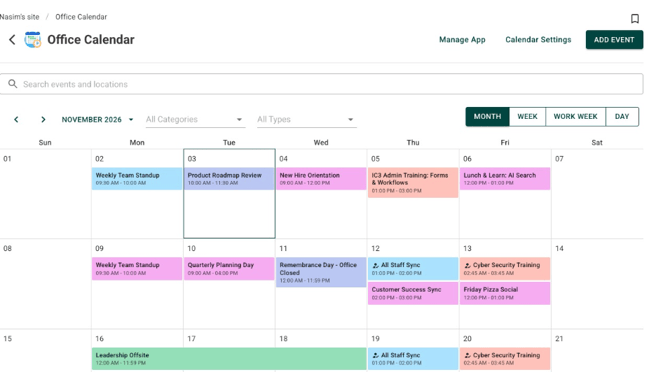
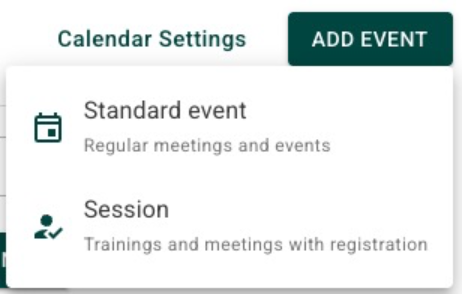
The Events Calendar can now run training sessions, not just standard events.
- Standard: A traditional calendar event.
- Session: A training event that can include multiple dates, one or more instructors, and an optional registration capacity.
Flexible Registration Options
When creating a session, organizers can choose how employees register:
- Register once for all dates: One registration covers the entire session.
- Register for individual dates: Employees register separately for each date they wish to attend.

Important: The registration type cannot be changed once the session has been published.
RSVP and Cancellation Management
Employees can register for or cancel training sessions directly from:
- The session details page.
- What's New cards.
- Calendar event popups.
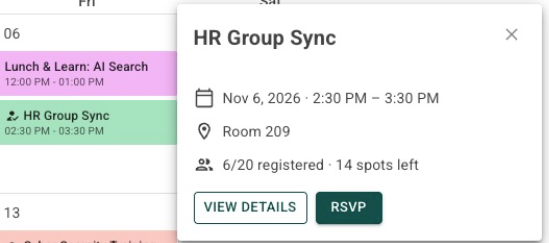
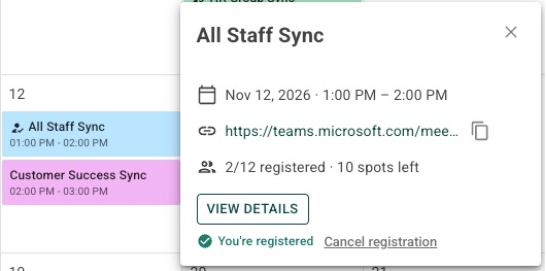
Registration limits are automatically enforced to prevent sessions from exceeding capacity or an individual from occupying more than one seat.
Manage Registrants
Administrators and the calendar app owner can manually add or remove registrants. All registration changes are recorded in an activity log.
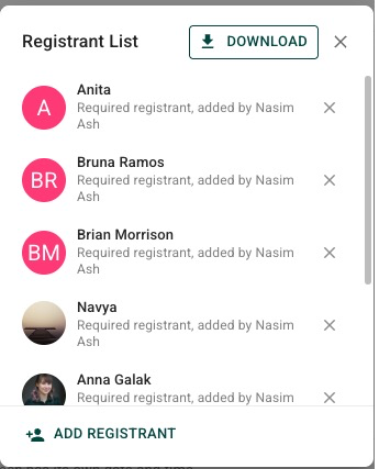
Organizers can also disable self-registration and self-cancellation when needed.
Automated Notifications and Reminders
Registrants receive in-app and email notifications for registrations, cancellations, and reminders.
Up to three reminders can be configured per session.
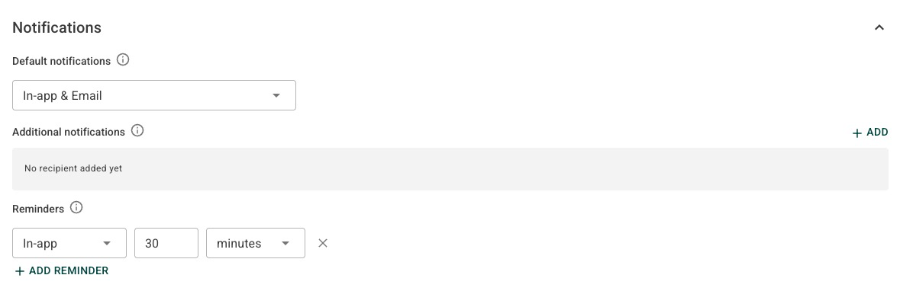
If a session date or time changes, all registered participants are automatically notified. The notification identifies the affected session and its updated start and end times.
Session Details and Reporting
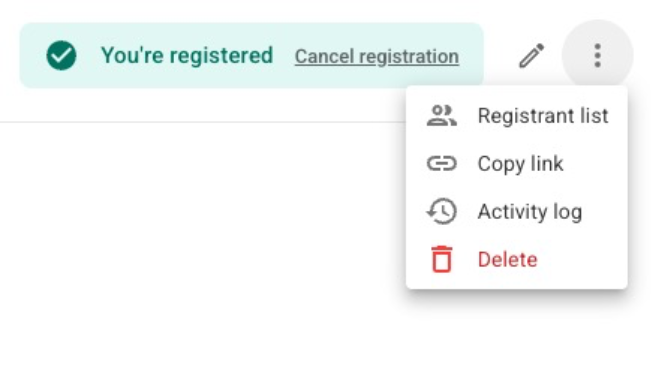
Each training session includes:
- A registrant list.
- CSV export of registrants.
- An activity log of registration changes.
Managing and Deleting Sessions
Organizers can delete an individual session, a session and all subsequent sessions, or an entire series.
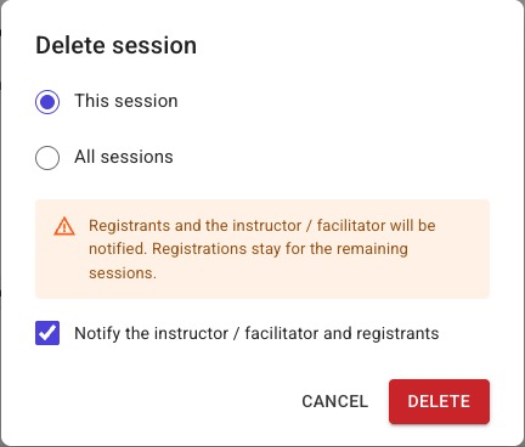
Past session dates are preserved, and affected registrants are notified of changes.
Finding Training Sessions
Training sessions now have a dedicated calendar icon and can be located using the calendar's search field and Standard/Session filter.
Calendar indicators, popups, and widgets display registration information such as 3/10 registered or Full.
Additional Fixes
- Deleting a promoted event now correctly removes its associated What's New card.
- Removing the first date row in the event creation form no longer incorrectly displays the time from the last row.
2. App Builder: Content Archiving
IC 3.0 now supports manual and automatic archiving of files and folders within App Builder applications.
This allows organizations to manage older content while keeping it available for future reference.
What's New
Manual Archiving
Users with the appropriate permissions can archive a file or folder directly from its menu.
Once archived, the item remains stored within the application but is hidden from the active content view.
An Undo notification is available for five seconds immediately after archiving.
Archived Content Management
Each App Builder application now includes an Archived Content page with:
- An Archived Folders navigation tree.
- Search and sorting capabilities.
- Options to Unarchive, Delete, or Download individual items.
Restoring Archived Content
Archived files and folders can be restored when needed.
If the original folder is still archived, the user must select an active destination folder.
If another item already exists with the same name, IC 3.0 automatically adds a suffix such as (1) to prevent overwriting existing content.
The application's root folder cannot be archived.
Automatic Archiving and Retention Settings
Administrators can configure automatic archiving for each application using the following retention options:
- Off
- 1 month
- 3 months
- 6 months
- 12 months
A daily automated process archives content that has passed its specified archive date or exceeded the configured retention period.
Disabling Automatic Archiving
When automatic retention is turned off, administrators can choose:
- Keep Hidden: Previously archived content remains archived.
- Make Visible Again: Content archived automatically by the retention process is restored.
Content archived manually is not automatically restored.
Search Visibility
Archived content is removed from search results. Once restored, it becomes searchable again, subject to the applicable search settings and permissions.
Additional Fixes
- Archived folders can no longer be selected as destinations when moving or restoring content.
- Moving files and folders now includes server-side permission validation for improved security.
3. Migration: Archived Content from IC 2.0
The migration process has been enhanced to preserve the archived status of content migrated from IC 2.0.
Previously archived items now arrive in IC 3.0 as archived rather than appearing as active content.
What's New
- Administrators can choose whether to migrate archived content for each eligible application.
- The option appears only when the source application contains archived items.
- The Migration page displays the number of archived items available.
- A site-level shortcut is available to simplify selection.
- Original creation and modification dates are preserved during migration.
This improvement helps organizations maintain their existing content lifecycle and archival structure when transitioning to IC 3.0.
4. Forms & Workflows
Version 3.7.6 introduces several enhancements to form design, workflow approvals, notifications, and file handling.
What's New
Expanded Workflow Approver Options
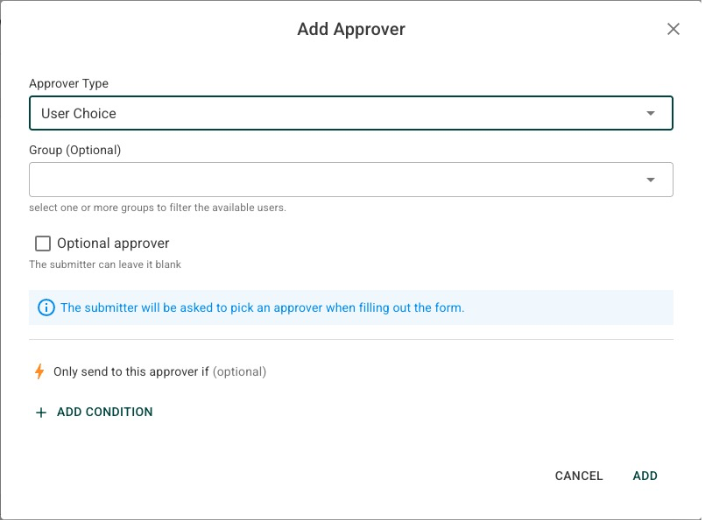
User Choice approver: Any workflow stage, including the first, can now be set to "User Choice." Previously only later stages supported it. The submitter (for the first stage) or the previous stage's approver (for later stages) sees a picker and must choose someone before the form can move on. You can also select more than one group to limit who can be picked.
Number and Currency Formatting
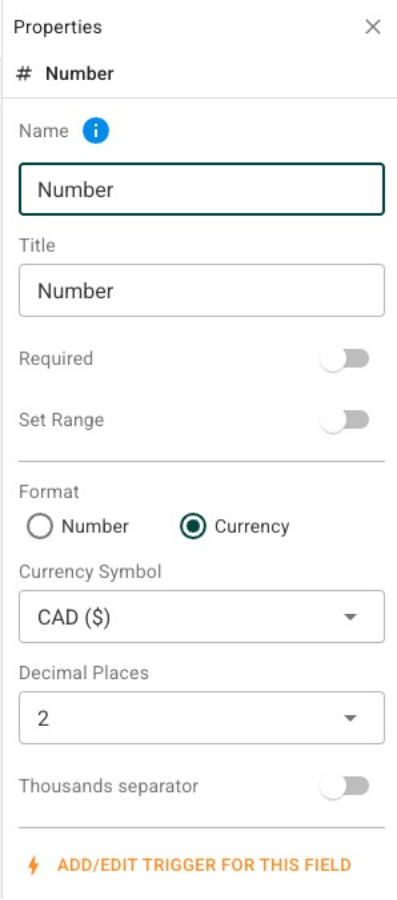
Number fields have a new Format option (Number or Currency), a Decimal Places option (0, 2 or 4), and an optional thousands separator. The currency symbol selector only appears when you choose Currency. Only the way the value is displayed in the response view changes. The stored value stays unformatted, and existing number fields look the same after the upgrade.
Customizable Workflow Notifications
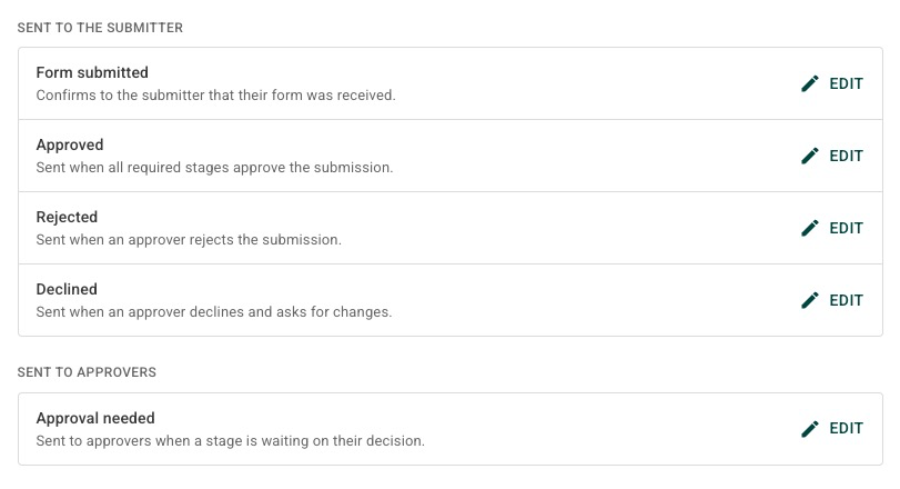
Notification Settings has a new "Include response details in email for intranet users" toggle, off by default for new and existing forms. When it is on, emails to intranet users list the submitted answers below the email body. Emails to external recipients always include the answers, regardless of this setting. Fields marked private are left out, and a section or page made up entirely of private fields doesn't show its heading. Blank fields show as "Field name: -". Email notifications have also been refreshed.
Collaboration: Collaboration fields can now be set to view-only, not just hidden or fully editable. Collaboration no longer needs a workflow stage, so collaborators are assigned independently of approval routing. "Approval Workflow / Collaboration" is now "Approval / Collaboration", "Add Submission Collaboration Stage" is now "Add Collaboration", and "Approval History" is now "Workflow History". The More menu is back in the admin Form Submission view.
Employee (All Staff) control: The control can now be filtered by group. Leave the filter empty and it works as before. Pick one or more groups to narrow the list to the combined membership of those groups. Existing forms are not affected.
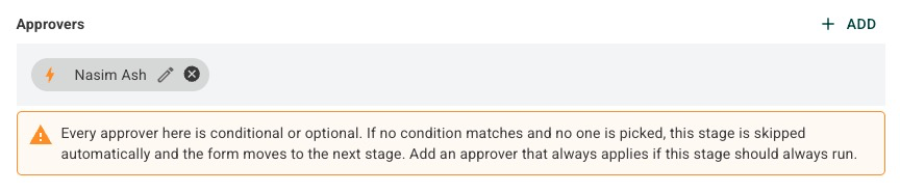
Workflow designer warning: The designer now shows a warning next to any stage whose approvers are all conditional or optional, because that stage could end up with nobody assigned and be skipped automatically.
Expanded Form Table Layouts
Tables in the Form Builder now support up to eight columns, increased from four.
Three additional row layouts are available in the Change Layout menu:
- 2:1:1
- 1:1:2
- 1:1:1:1
Employee Selection by Group
The Employee (All Staff) form control can now be filtered by employee group, allowing more targeted selections.
Site-Wide Time Zone Settings
A new site-wide time zone setting is available within Global Settings.
Improved IC 2.0 File and Link Form Migration
IC 2.0 File and Link forms now migrate into a new Other Forms Documents & Folders application on the home site.
Existing form categories are recreated as folders, preserving their organizational structure rather than creating empty forms.
Improvements and Fixes
- Date and time values now display correctly in Form Grid View.
- PDF attachments open directly rather than first loading into memory.
- File uploads now stream to the server, resolving an error encountered during some uploads.
- Buy and Sell and Knowledge Base app templates now support photo attachments and allow the title field to be deleted.
- Migrated workflow triggers now display the correct option label rather than the original IC 2.0 option ID.
- PDFs can now be opened even when the Microsoft Edge PDF viewer is disabled.
5. Employee Directory & People Management
This release introduces a dedicated Employee Directory management role and several improvements to employee profiles, synchronization, and widgets.
What's New
Employee Directory Manager Role
A new Employee Directory Manager role allows designated HR personnel to manage employee information without requiring full administrator access.
Users assigned only this role can:
- Edit employee profiles.
- Manage Employee Directory fields.
- Update the organizational structure.
Their administration menu displays only Employees & Org.
This role does not permit users to create, delete, or disable employee accounts, import CSV files, or access other administration areas.
Improved Employee Profile Permissions
Saving an employee profile no longer changes the employee's account status, email address, or synchronization reference unless the person making the change has the necessary user management permissions.
Azure Synchronization Improvements
- Work Anniversary is now linked directly to the employee's hire date.
- Skills and About Me fields no longer incorrectly display a "not supported" message.
Employee List and Celebration Widgets
The Employee List and Celebration widgets now make better use of the available space when displayed at Small size, preventing employee information from being clipped or omitted.
The Celebration widget's Show Upcoming options now use clearer labels: A week and A month.
Additional Fixes
- Resolved a Forbidden error when exporting Employee Directory data to CSV.
- Azure synchronization now prevents employees from being assigned as their own supervisor.
- Entra ID group synchronization now correctly removes users from IC 3.0 groups when they are removed from the corresponding Entra groups, including when the account was previously disabled.
- The User Picker now displays only enabled users.
6. Global Search: Visibility and Permissions
Administrators now have greater control over which sites, applications, and pages appear in global search results.
What's New
Include or Exclude Content from Search
A new Search Result section is available under Global Search Settings.
Administrators can select a site, application, or page from the sitemap and enable or disable its visibility in global search.
The same setting is also available within the View Sites, Apps and Pages administration panels, with confirmation required when changing it.
Search Setting Inheritance
Applications and pages inherit their parent site's search visibility setting.
Individual application and page preferences are retained. If a site is disabled from search and later re-enabled, its previous application and page settings are restored.
Improved Search Permissions
Global search now respects application-level viewing permissions.
Content from an application will no longer appear in search results for users who do not have permission to view that application.
7. Security, Permissions & Content Management
Version 3.7.6 strengthens administrative access controls and improves permission enforcement throughout the platform.
Improvements
Restricted Administrative Pages
System Configuration and administrative pages are now accessible only to users with the Super Admin or Admin role.
Previously, some administrative pages were hidden from the navigation menu but could still be accessed directly through a saved or manually entered URL.
Access restrictions now apply to administrative areas including:
- General Settings and Login Authentication.
- Synchronization and Email Setup.
- System Setup and Task Manager.
- Global Search Settings.
- Translations and Dictionaries.
- Analytics Overview.
- Update Manager and Migration.
Unauthorized users now receive the standard Not Authorized message, and no administrative page data is loaded.
App-Level View Permissions
Application-level View permissions are now enforced even when the application's default root folder allows general viewing access.
Content Creation Permissions
Resolved an issue where users adding a document with an attached file could receive both a success message and a Not Authorized message.
Synced Phone Numbers
Administrators can now modify permissions for users whose synchronized mobile phone numbers contain periods, such as 206.555.0123.
Read & Confirm and Review Date Validation
Due-date validation has been corrected so that past dates are rejected while the current date is accepted.
8. General Fixes & Platform Improvements
This release also includes several usability, migration, and performance-related improvements.
Error Message Handling
Resolved an issue where a red Failed to fetch message could appear on a page even though the error originated from a previously visited page.
Errors affecting the current page and failed save operations will continue to display as expected.
Story Image Formatting
Story images now use a consistent 16:9 aspect ratio across story cards and previews.
Message Widget Navigation
Links within Message widgets that point to another widget page or content page now load the destination correctly, rather than changing only the browser URL.
Folder Directory Visibility
The Folder Directory button is now available to all users, allowing the folder drawer to be reopened after it has been closed.
This also resolves an issue where the Employee Recognition folder could disappear for regular users.
Login Navigation
Users who are already signed in and navigate to /login are now redirected back to their previous location rather than starting another sign-in process.
IC 2.0 Blogs and Discussions Migration
Built-in Company Blogs and Topic Discussions applications now migrate with their associated content, including:
- Folders.
- Posts.
- Comments.
- Discussion threads.
Previously, these applications could migrate without their content.
Improved Browser Updates and Cache Handling
Following a product update, browsers now automatically retrieve the latest IC 3.0 files instead of continuing to use outdated versions.
This helps prevent broken layouts and JavaScript errors caused by stale browser files and reduces the need for users to manually clear their browser data.
The improvement also supports environments using internal .local domains.
Changes to site configuration can now reach users without requiring a new application build.
Summary
IC 3.0 version 3.7.6 delivers improvements across several key areas:
- Training and Events: Multi-date training sessions, registration management, capacity limits, reminders, and reporting.
- Content Management: Manual and automatic archiving with retention controls and restoration options.
- Migration: Better preservation of archived content, File and Link forms, Company Blogs, and Topic Discussions from IC 2.0.
- Forms and Workflows: More flexible approval stages, customized notifications, number formatting, expanded layouts, and improved file handling.
- Employee Management: A dedicated Employee Directory Manager role, synchronization fixes, and improved widgets.
- Global Search: Greater control over search visibility and stronger permission enforcement.
- Security and Reliability: Improved administrative access restrictions, navigation, error handling, and automatic browser updates.
These updates provide administrators with more flexibility, strengthen platform security, and improve the overall experience for employees transitioning to and working within IC 3.0.