
---
1. Go to admin mode by clicking on the wrench icon top right

2. Click on Security & Permissions

3. Click on Logins

4. Find an account: scrolling or search by name/email

5. Click on EDIT

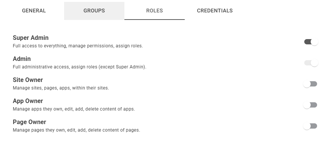
6. Click on ROLES

7. Toggle user roles to assign
1. Go to admin mode by clicking on the wrench icon top right
2. Click on Security & Permissions
3. Click on Logins
4. Find an account: scrolling or search by name/email
5. Click on EDIT
6. Click on ROLES
7. Toggle user roles to assign