
IC 2.0 and IC 3.0 can run side by side. This allows you to get used to 3.0 while still using features from 2.0 if needed.
Content Clean Up
Even the most dedicated intranet admin can accumulate aging and unused content. Take this migration as an opportunity to conduct a content audit to see what is important and what can be left behind. Here are some questions to kick start your thinking:
- How often is this content viewed or accessed?
- Are users engaging with the content?
- Is it being shared or referenced internally?
Tackling your intranet sound too daunting? Consider starting to scratch. If your intranet has grown into a maze of sites, pages and documents that hinders more than it helps, consider taking this time to start new and build a strong foundation.
What gets moved over:
Our migration wizard brings over your home and department sites, documents, apps, files, and layout. Same for access settings like users, groups, and permissions.
Because of the mobile responsive nature of IC 3.0, your layout may need some adjusting to ensure all content is optimized for both desktop and mobile.
| What Gets Moved Over | What Might Need Adjusting |
|
|
Migration Steps
- Prepare a fresh Windows Server
- Install IC 3.0 with a new URL*
- Extract files from the existing intranet
- Backup existing intranet database (not the stats)
- Copy files and database to the new server
- Run migration wizard via IC 3.0 to migrate apps
Timeline: 1-2 sessions
Downtime: Minimal
* Note we have changed the install process for IC 3.0 to make it simpler and less time consuming. The average install time for IC 3.0 is 1-2 hrs, aside from copying the files from the old server to new
IT involvement
- Generate or provide a .pfx form certificate and password
- Provide details on Azure Entra ID for sync and authentication
- Facilitate access to IC2 web server to copy files and database
- Provision a web server, set web address and network rules
- Provide SMTP details for email notification
Migration Wizard
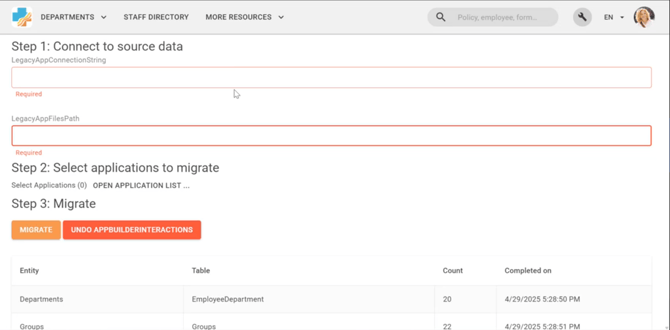
Version 1 of our migration wizard
System Requirements for IC 3.0 Install
Minimum IC2.0 version:
15.0.10
Operating System:
- Minimum: Windows Server 2019 Standard
- Recommended: Windows Server 2022 Standard or Datacenter (for longer support lifecycle and improved security)
Database:
- Minimum: SQL Server 2022 Express (if under 10 GB and light usage)
- Recommended: SQL Server 2022 Standard Edition (for full feature set and scalability)
Protection:
- Firewall Configuration
- Enable Windows Defender Firewall or a third-party firewall
- Restrict inbound traffic to only required ports (e.g., 80/443 for IIS, 1433 for SQL)
- Use IP whitelisting or network security groups (NSGs) in cloud environments
- Antivirus and Anti-malware
- Install and regularly update antivirus software (e.g., Microsoft Defender Antivirus)
- Enable real-time protection and scheduled scans
CPU
Intel
- Minimum: 4 cores (e.g., Intel Xeon E-2236 or Core i5/i7 equivalent)
- Recommended: 8 cores (e.g., Intel Xeon Silver 4310 or Core i9 equivalent)
AMD
- Minimum: 4 cores (e.g., AMD EPYC 7232P or Ryzen 5 5600)
- Recommended: 8 cores (e.g., AMD EPYC 7302P or Ryzen 9 5900)
RAM
- Minimum: 12 GB
- Recommended: 16–32 GB
- 8–12 GB for SQL Server (buffer pool, caching)
- 4–8 GB for IIS and OS
- Additional headroom for scheduled tasks and future growth
Hard Drive
SSD if possible
Recommended free space after install
- Minimum Free Space: 80 GB
- Covers base OS, IIS, .NET, SQL Server, and modest content growth
- Recommended Free Space: 120–150 GB
- Allows for:
- Larger video uploads
- SQL Server growth (logs, tempdb, backups)
- Application logs and cache
- Future updates and feature additions
Watch our in depth webinar here

All About Migration: Supporting Your Switch to IC 3.0 -> Watch Here
Sign Up For Our Newsletter (The Source)
Get all your IC news in one place, once a month? From event announcements, to exclusive behind the build looks, The Source has it all.
Need More Help?
Looking for our full migration guide? Check out this article here.
If you have any questions or want to talk through your migration in more detail, your Customer Experience team is here to support you every step of the way.
Reach out to your CSM or contact us directly at customercare@intranetconnections.com.