---
title: What's New Feed Widget
description: Learn how to use the What’s New feed widget in IC 3.0 to highlight recently published intranet content. This article covers promoting content, adding thumbnails and animations, scheduling posts, enabling emoji reactions, and displaying comment previews.
---
[Skip to content](https://learn.intranetconnections.com/whats-new-feed-widget#main-content)

Open main navigation
Close main navigation
- [Contact Support](mailto:support@intranetconnections.com)
[Contact Support](mailto:support@intranetconnections.com)
How can we help you?
- There are no suggestions because the search field is empty.
1. [IC Knowledge Hub](https://learn.intranetconnections.com/?hsLang=en-ca)
2. [Widgets](https://learn.intranetconnections.com/widgets?hsLang=en-ca)
3. [What's New Feed](https://learn.intranetconnections.com/widgets?hsLang=en-ca#whats-new-feed)
# What's New Feed Widget
## The What's New feed widget displays a list of advertised items from all applications across the site.
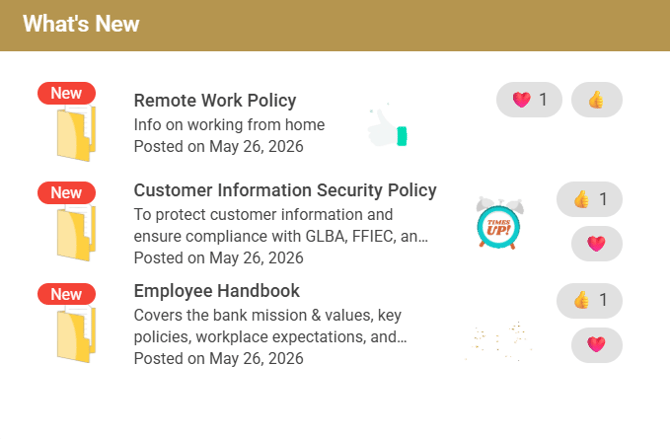
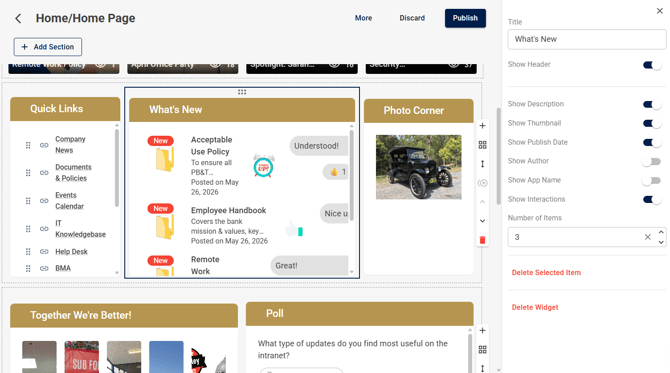
This is a great way to show your employees new items that have been recently published on the intranet. Only items which have been advertised will appear in this widget. When publishing content, you'll have the option to Promote to the What's New feed widget.
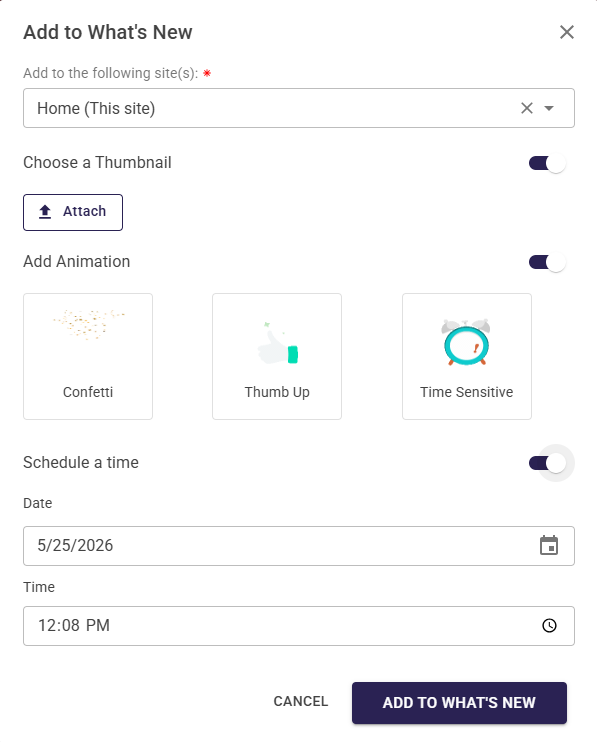
When promoting content to the What's New feed widget, you can add and Animation, or choose a Thumbnail you want displayed, you'll be able to select these options when you are prompted to add to the widget when you publish content.
You can choose to Promote to the What's New feed immediately, or you can schedule a time in the future.
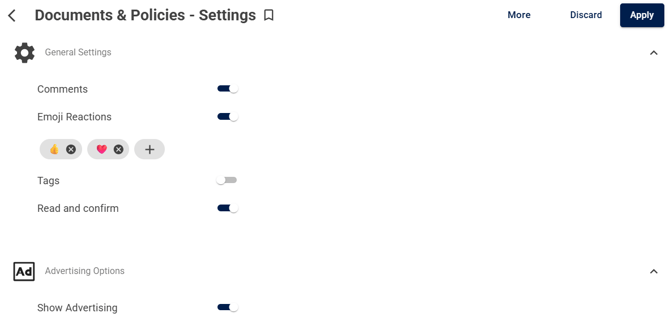
In order to display emoji reactions on content in the What's New feed widget, you'll need to have this set up in each app's settings. Turn on Emoji Reactions and add the specific emojis you want to let your users react to. To add emoji, you will need to copy paste the emojis from a site like GetEmoji.
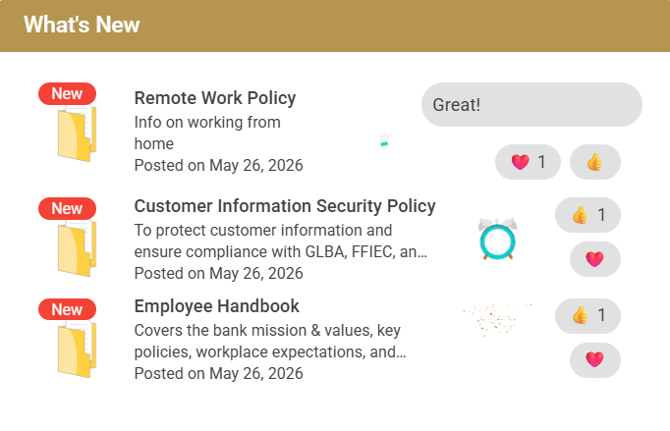
When comments are enabled, when users leave comments on content, the What's New feed will also display a preview of the comments that have been left.
You can also manage what information is displayed in the widget, according to your needs. You have the options to display or hide:
- Description
- Thumbnail
- Publish Date
- Author
- App Name
- Interactions (this needs to be on to display emoji reactions and comments in the widget)
- Number of items displayed at a time
- [FAQs](https://learn.intranetconnections.com/faqs?hsLang=en-ca#main-content)
- [AI](https://learn.intranetconnections.com/faqs?hsLang=en-ca#ai)
- [Onboarding & Setup](https://learn.intranetconnections.com/onboarding-setup?hsLang=en-ca#main-content)
- [Migration](https://learn.intranetconnections.com/onboarding-setup?hsLang=en-ca#migration)
- [Theme & Design](https://learn.intranetconnections.com/onboarding-setup?hsLang=en-ca#theme-design)
- [Installation](https://learn.intranetconnections.com/onboarding-setup?hsLang=en-ca#installation)
- [Product News](https://learn.intranetconnections.com/product-news?hsLang=en-ca#main-content)
- [Release Notes](https://learn.intranetconnections.com/product-news?hsLang=en-ca#release-notes)
- [Product Patches](https://learn.intranetconnections.com/product-news?hsLang=en-ca#product-patches)
- [Reports](https://learn.intranetconnections.com/reports?hsLang=en-ca#main-content)
- [Intranet Analytics](https://learn.intranetconnections.com/reports?hsLang=en-ca#intranet-analytics)
- [Integrations](https://learn.intranetconnections.com/integrations?hsLang=en-ca#main-content)
- [SharePoint](https://learn.intranetconnections.com/integrations?hsLang=en-ca#sharepoint)
- [AI](https://learn.intranetconnections.com/integrations?hsLang=en-ca#ai)
- [Support](https://learn.intranetconnections.com/support?hsLang=en-ca)
- [Technical Setup & Configuration](https://learn.intranetconnections.com/technical-setup-configuration?hsLang=en-ca#main-content)
- [Intranet Settings](https://learn.intranetconnections.com/technical-setup-configuration?hsLang=en-ca#intranet-settings)
- [Disaster Recovery](https://learn.intranetconnections.com/technical-setup-configuration?hsLang=en-ca#disaster-recovery)
- [Advanced Configuration](https://learn.intranetconnections.com/technical-setup-configuration?hsLang=en-ca#advanced-configuration)
- [How To's](https://learn.intranetconnections.com/how-tos?hsLang=en-ca#main-content)
- [Multilingual](https://learn.intranetconnections.com/how-tos?hsLang=en-ca#multilingual)
- [Navigation](https://learn.intranetconnections.com/how-tos?hsLang=en-ca#navigation)
- [Intranet Architecture](https://learn.intranetconnections.com/how-tos?hsLang=en-ca#intranet-architecture)
- [Security & Permissions](https://learn.intranetconnections.com/how-tos?hsLang=en-ca#security-permissions)
- [Private Cloud](https://learn.intranetconnections.com/how-tos?hsLang=en-ca#private-cloud)
- [Feature Requests](https://learn.intranetconnections.com/how-tos?hsLang=en-ca#feature-requests)
- [Forms & Workflows](https://learn.intranetconnections.com/how-tos?hsLang=en-ca#forms-workflows)
- [Your Guide to Transitioning to IC 3.0](https://learn.intranetconnections.com/how-tos?hsLang=en-ca#your-guide-to-transitioning-to-ic-3-0)
- [Best Practices](https://learn.intranetconnections.com/best-practices?hsLang=en-ca#main-content)
- [Design](https://learn.intranetconnections.com/best-practices?hsLang=en-ca#design)
- [Getting Started](https://learn.intranetconnections.com/best-practices?hsLang=en-ca#getting-started)
- [Applications](https://learn.intranetconnections.com/applications?hsLang=en-ca#main-content)
- [Documents](https://learn.intranetconnections.com/applications?hsLang=en-ca#documents)
- [Internal Resources](https://learn.intranetconnections.com/applications?hsLang=en-ca#internal-resources)
- [Announcements](https://learn.intranetconnections.com/applications?hsLang=en-ca#announcements)
- [Engagement](https://learn.intranetconnections.com/applications?hsLang=en-ca#engagement)
- [Advertising](https://learn.intranetconnections.com/applications?hsLang=en-ca#advertising)
- [Account & Support](https://learn.intranetconnections.com/account-support?hsLang=en-ca#main-content)
- [Our Services](https://learn.intranetconnections.com/account-support?hsLang=en-ca#our-services)
- [Security](https://learn.intranetconnections.com/security?hsLang=en-ca#main-content)
- [Security News & Updates](https://learn.intranetconnections.com/security?hsLang=en-ca#security-news-updates)
- [Widgets](https://learn.intranetconnections.com/widgets?hsLang=en-ca#main-content)
- [What's New Feed](https://learn.intranetconnections.com/widgets?hsLang=en-ca#whats-new-feed)
- [Content & Media Widgets](https://learn.intranetconnections.com/widgets?hsLang=en-ca#content-media-widgets)
- [Engagement Widgets](https://learn.intranetconnections.com/widgets?hsLang=en-ca#engagement-widgets)
[](https://intranetconnections.com)
Copyright © 2025, Intranet Connections
```json
{
"@context" : "https://schema.org",
"@type" : "VideoObject",
"contentUrl" : "https://7578106.fs1.hubspotusercontent-na1.net/hubfs/7578106/video_assets/213725259871/inherited/web_optimized.mp4",
"dateModified" : "2026-05-27T21:08:57.950Z",
"duration" : "PT1M40S",
"height" : 1080,
"name" : "IC 3.0 Whats New Feed Widget",
"thumbnailUrl" : "https://7578106.fs1.hubspotusercontent-na1.net/hubfs/7578106/IC%203.0%20Whats%20New%20Feed%20Widget.mp4/medium.jpg",
"uploadDate" : "2026-05-27T21:08:43.566Z",
"width" : 1920
}
```