---
title: Photo Gallery
description: Learn how to create and customize the Photo Gallery App, organize photos, manage permissions, configure settings, promote content, and display galleries in widgets.
---
[Skip to content](https://learn.intranetconnections.com/photo-gallery#main-content)

Open main navigation
Close main navigation
- [Contact Support](mailto:support@intranetconnections.com)
[Contact Support](mailto:support@intranetconnections.com)
How can we help you?
- There are no suggestions because the search field is empty.
1. [IC Knowledge Hub](https://learn.intranetconnections.com/?hsLang=en-ca)
2. [Applications](https://learn.intranetconnections.com/applications?hsLang=en-ca)
3. [Engagement](https://learn.intranetconnections.com/applications?hsLang=en-ca#engagement)
# Photo Gallery
## Photo Gallery lets you show off staff and organization photos within your intranet.
The Photo Gallery App allows you to organize photos by type, event, or any other grouping. Photos can be flipped through in a slideshow, and have titles and descriptions added.
#### **Build Your Photo Gallery**
Start by following the process to [add an App to a site](https://learn.intranetconnections.com/sites-0-0?hsLang=en-ca).
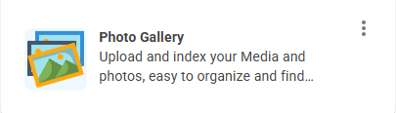
Once you have the App in place, click on the three columns on the App Card to explore available customizations. To open the App, click 'Go to App'
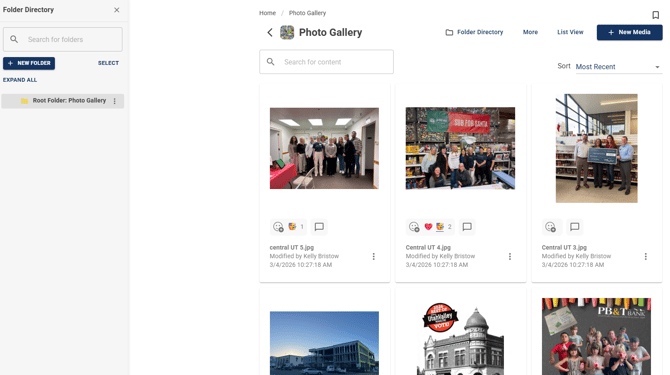
You can either upload new contents directly or create a list of folders to group new contents.
To add new content, click + New Media
To create new sub folder, click + New Folder \> Add new content to selected folder.
#### View Options
Grid View
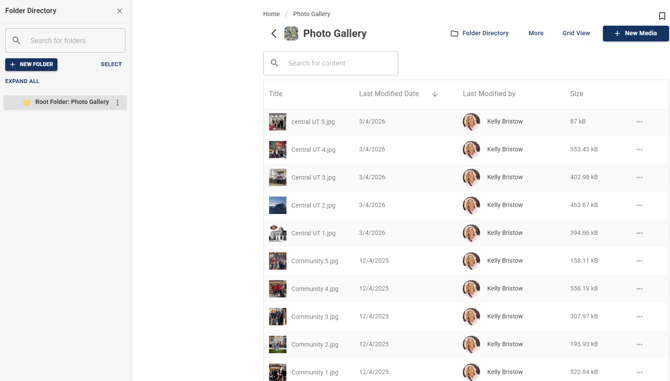
List View
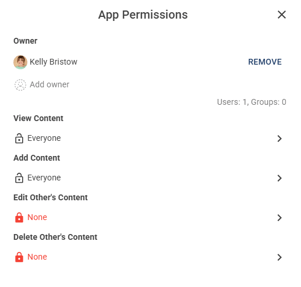
#### **Add, Edit & Delete App Permissions**
Edit 'View Content', Add 'Content', Edit 'Other's Content' & Delete 'Other's Content'
#### **App Settings**
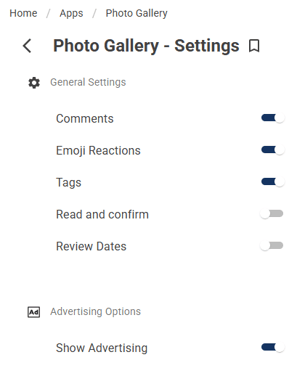
Toggle Comments, Emojis, Advertising Options
#### **Export App Template**
Customized App template can be exported and imported in a different site
**To import:** Open Site Card \> Apps \> Create App from Template \> Import Template \> Selected downloaded template to import
#### **Promote Items**
Ensure Advertising Options has been turned on in App Settings.
Upload a photo \> 3 dot menu on the photo you just uploaded \> click Details \> Promote
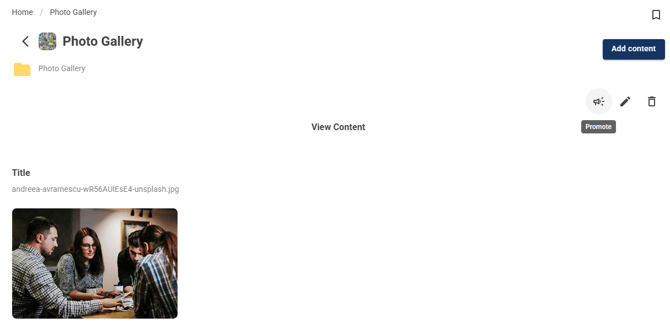
Then the Promote window will be displayed.
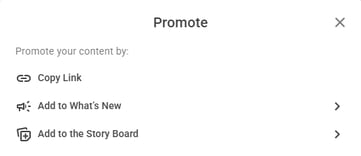
To see details on the What's New feed widget, click [here](https://learn.intranetconnections.com/whats-new-feed-widget?hsLang=en-ca). To see details on the Story Board, click [here](https://learn.intranetconnections.com/storyboard?hsLang=en-ca).
#### Display the Photo Gallery App in a Widget
Use the App Feed widget to add the app to a widget pageAdd Widget \> App Feed \> Select Source App
**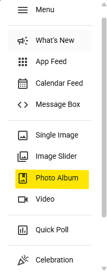 \> 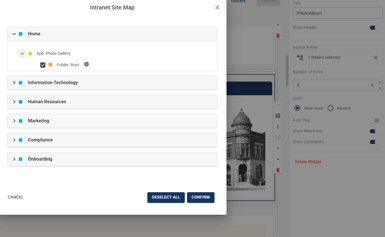\>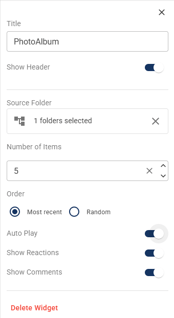**
#### **Photo Gallery Widget Display**
Once the gallery is displayed in widget, users can interact directly with the content with emoji reactions and comments.
****
- [FAQs](https://learn.intranetconnections.com/faqs?hsLang=en-ca#main-content)
- [AI](https://learn.intranetconnections.com/faqs?hsLang=en-ca#ai)
- [Onboarding & Setup](https://learn.intranetconnections.com/onboarding-setup?hsLang=en-ca#main-content)
- [Migration](https://learn.intranetconnections.com/onboarding-setup?hsLang=en-ca#migration)
- [Theme & Design](https://learn.intranetconnections.com/onboarding-setup?hsLang=en-ca#theme-design)
- [Installation](https://learn.intranetconnections.com/onboarding-setup?hsLang=en-ca#installation)
- [Product News](https://learn.intranetconnections.com/product-news?hsLang=en-ca#main-content)
- [Release Notes](https://learn.intranetconnections.com/product-news?hsLang=en-ca#release-notes)
- [Product Patches](https://learn.intranetconnections.com/product-news?hsLang=en-ca#product-patches)
- [Reports](https://learn.intranetconnections.com/reports?hsLang=en-ca#main-content)
- [Intranet Analytics](https://learn.intranetconnections.com/reports?hsLang=en-ca#intranet-analytics)
- [Integrations](https://learn.intranetconnections.com/integrations?hsLang=en-ca#main-content)
- [SharePoint](https://learn.intranetconnections.com/integrations?hsLang=en-ca#sharepoint)
- [AI](https://learn.intranetconnections.com/integrations?hsLang=en-ca#ai)
- [Support](https://learn.intranetconnections.com/support?hsLang=en-ca)
- [Technical Setup & Configuration](https://learn.intranetconnections.com/technical-setup-configuration?hsLang=en-ca#main-content)
- [Intranet Settings](https://learn.intranetconnections.com/technical-setup-configuration?hsLang=en-ca#intranet-settings)
- [Disaster Recovery](https://learn.intranetconnections.com/technical-setup-configuration?hsLang=en-ca#disaster-recovery)
- [Advanced Configuration](https://learn.intranetconnections.com/technical-setup-configuration?hsLang=en-ca#advanced-configuration)
- [How To's](https://learn.intranetconnections.com/how-tos?hsLang=en-ca#main-content)
- [Multilingual](https://learn.intranetconnections.com/how-tos?hsLang=en-ca#multilingual)
- [Navigation](https://learn.intranetconnections.com/how-tos?hsLang=en-ca#navigation)
- [Intranet Architecture](https://learn.intranetconnections.com/how-tos?hsLang=en-ca#intranet-architecture)
- [Security & Permissions](https://learn.intranetconnections.com/how-tos?hsLang=en-ca#security-permissions)
- [Private Cloud](https://learn.intranetconnections.com/how-tos?hsLang=en-ca#private-cloud)
- [Feature Requests](https://learn.intranetconnections.com/how-tos?hsLang=en-ca#feature-requests)
- [Forms & Workflows](https://learn.intranetconnections.com/how-tos?hsLang=en-ca#forms-workflows)
- [Your Guide to Transitioning to IC 3.0](https://learn.intranetconnections.com/how-tos?hsLang=en-ca#your-guide-to-transitioning-to-ic-3-0)
- [Best Practices](https://learn.intranetconnections.com/best-practices?hsLang=en-ca#main-content)
- [Design](https://learn.intranetconnections.com/best-practices?hsLang=en-ca#design)
- [Getting Started](https://learn.intranetconnections.com/best-practices?hsLang=en-ca#getting-started)
- [Applications](https://learn.intranetconnections.com/applications?hsLang=en-ca#main-content)
- [Documents](https://learn.intranetconnections.com/applications?hsLang=en-ca#documents)
- [Internal Resources](https://learn.intranetconnections.com/applications?hsLang=en-ca#internal-resources)
- [Announcements](https://learn.intranetconnections.com/applications?hsLang=en-ca#announcements)
- [Engagement](https://learn.intranetconnections.com/applications?hsLang=en-ca#engagement)
- [Advertising](https://learn.intranetconnections.com/applications?hsLang=en-ca#advertising)
- [Account & Support](https://learn.intranetconnections.com/account-support?hsLang=en-ca#main-content)
- [Our Services](https://learn.intranetconnections.com/account-support?hsLang=en-ca#our-services)
- [Security](https://learn.intranetconnections.com/security?hsLang=en-ca#main-content)
- [Security News & Updates](https://learn.intranetconnections.com/security?hsLang=en-ca#security-news-updates)
- [Widgets](https://learn.intranetconnections.com/widgets?hsLang=en-ca#main-content)
- [What's New Feed](https://learn.intranetconnections.com/widgets?hsLang=en-ca#whats-new-feed)
- [Content & Media Widgets](https://learn.intranetconnections.com/widgets?hsLang=en-ca#content-media-widgets)
- [Engagement Widgets](https://learn.intranetconnections.com/widgets?hsLang=en-ca#engagement-widgets)
[](https://intranetconnections.com)
Copyright © 2025, Intranet Connections
```json
{
"@context" : "https://schema.org",
"@type" : "VideoObject",
"contentUrl" : "https://7578106.fs1.hubspotusercontent-na1.net/hubfs/7578106/video_assets/221952623268/inherited/web_optimized.mp4",
"dateModified" : "2026-09-15T14:44:32.979Z",
"duration" : "PT1M48S",
"height" : 1080,
"name" : "IC 3.0 Employee Directory",
"thumbnailUrl" : "https://7578106.fs1.hubspotusercontent-na1.net/hubfs/7578106/IC%203.0%20Employee%20Directory.mp4/medium.jpg",
"uploadDate" : "2026-09-15T14:44:32.977Z",
"width" : 1920
}
```