---
title: IC 3.0 Manage & Create New Apps
description: Learn how to create and manage intranet team sites, with best practices for site ownership and access control.
---
[Skip to content](https://learn.intranetconnections.com/manage-create-new-apps#main-content)

Open main navigation
Close main navigation
- [Contact Support](mailto:support@intranetconnections.com)
[Contact Support](mailto:support@intranetconnections.com)
How can we help you?
- There are no suggestions because the search field is empty.
1. [IC Knowledge Hub](https://learn.intranetconnections.com/?hsLang=en-ca)
2. [How To's](https://learn.intranetconnections.com/how-tos?hsLang=en-ca)
3. [Intranet Architecture](https://learn.intranetconnections.com/how-tos?hsLang=en-ca#intranet-architecture)
# IC 3.0 Manage & Create New Apps
## Manage and Create New Apps
Add App to existing Site
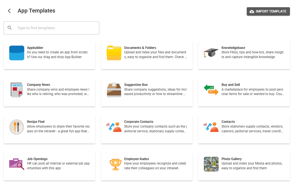
Site \> See Apps \> Create App from template
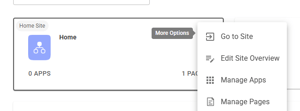

To edit titles, description, icons, add new app and click on the dots which indicates more options

Click on Edit Title, Desc & Image

Edit and save

Click App \> Edit Configuration to allow you drag and drop to add new fields, change orders. You can also delete fields, change layout etc.

- [FAQs](https://learn.intranetconnections.com/faqs?hsLang=en-ca#main-content)
- [AI](https://learn.intranetconnections.com/faqs?hsLang=en-ca#ai)
- [Onboarding & Setup](https://learn.intranetconnections.com/onboarding-setup?hsLang=en-ca#main-content)
- [Migration](https://learn.intranetconnections.com/onboarding-setup?hsLang=en-ca#migration)
- [Theme & Design](https://learn.intranetconnections.com/onboarding-setup?hsLang=en-ca#theme-design)
- [Installation](https://learn.intranetconnections.com/onboarding-setup?hsLang=en-ca#installation)
- [Product News](https://learn.intranetconnections.com/product-news?hsLang=en-ca#main-content)
- [Release Notes](https://learn.intranetconnections.com/product-news?hsLang=en-ca#release-notes)
- [Product Patches](https://learn.intranetconnections.com/product-news?hsLang=en-ca#product-patches)
- [Reports](https://learn.intranetconnections.com/reports?hsLang=en-ca#main-content)
- [Intranet Analytics](https://learn.intranetconnections.com/reports?hsLang=en-ca#intranet-analytics)
- [Integrations](https://learn.intranetconnections.com/integrations?hsLang=en-ca#main-content)
- [SharePoint](https://learn.intranetconnections.com/integrations?hsLang=en-ca#sharepoint)
- [AI](https://learn.intranetconnections.com/integrations?hsLang=en-ca#ai)
- [Support](https://learn.intranetconnections.com/support?hsLang=en-ca)
- [Technical Setup & Configuration](https://learn.intranetconnections.com/technical-setup-configuration?hsLang=en-ca#main-content)
- [Intranet Settings](https://learn.intranetconnections.com/technical-setup-configuration?hsLang=en-ca#intranet-settings)
- [Disaster Recovery](https://learn.intranetconnections.com/technical-setup-configuration?hsLang=en-ca#disaster-recovery)
- [Advanced Configuration](https://learn.intranetconnections.com/technical-setup-configuration?hsLang=en-ca#advanced-configuration)
- [How To's](https://learn.intranetconnections.com/how-tos?hsLang=en-ca#main-content)
- [Multilingual](https://learn.intranetconnections.com/how-tos?hsLang=en-ca#multilingual)
- [Navigation](https://learn.intranetconnections.com/how-tos?hsLang=en-ca#navigation)
- [Intranet Architecture](https://learn.intranetconnections.com/how-tos?hsLang=en-ca#intranet-architecture)
- [Security & Permissions](https://learn.intranetconnections.com/how-tos?hsLang=en-ca#security-permissions)
- [Private Cloud](https://learn.intranetconnections.com/how-tos?hsLang=en-ca#private-cloud)
- [Feature Requests](https://learn.intranetconnections.com/how-tos?hsLang=en-ca#feature-requests)
- [Forms & Workflows](https://learn.intranetconnections.com/how-tos?hsLang=en-ca#forms-workflows)
- [Your Guide to Transitioning to IC 3.0](https://learn.intranetconnections.com/how-tos?hsLang=en-ca#your-guide-to-transitioning-to-ic-3-0)
- [Best Practices](https://learn.intranetconnections.com/best-practices?hsLang=en-ca#main-content)
- [Design](https://learn.intranetconnections.com/best-practices?hsLang=en-ca#design)
- [Getting Started](https://learn.intranetconnections.com/best-practices?hsLang=en-ca#getting-started)
- [Applications](https://learn.intranetconnections.com/applications?hsLang=en-ca#main-content)
- [Documents](https://learn.intranetconnections.com/applications?hsLang=en-ca#documents)
- [Internal Resources](https://learn.intranetconnections.com/applications?hsLang=en-ca#internal-resources)
- [Announcements](https://learn.intranetconnections.com/applications?hsLang=en-ca#announcements)
- [Engagement](https://learn.intranetconnections.com/applications?hsLang=en-ca#engagement)
- [Advertising](https://learn.intranetconnections.com/applications?hsLang=en-ca#advertising)
- [Account & Support](https://learn.intranetconnections.com/account-support?hsLang=en-ca#main-content)
- [Our Services](https://learn.intranetconnections.com/account-support?hsLang=en-ca#our-services)
- [Security](https://learn.intranetconnections.com/security?hsLang=en-ca#main-content)
- [Security News & Updates](https://learn.intranetconnections.com/security?hsLang=en-ca#security-news-updates)
- [Widgets](https://learn.intranetconnections.com/widgets?hsLang=en-ca#main-content)
- [What's New Feed](https://learn.intranetconnections.com/widgets?hsLang=en-ca#whats-new-feed)
- [Content & Media Widgets](https://learn.intranetconnections.com/widgets?hsLang=en-ca#content-media-widgets)
- [Engagement Widgets](https://learn.intranetconnections.com/widgets?hsLang=en-ca#engagement-widgets)
[](https://intranetconnections.com)
Copyright © 2025, Intranet Connections
```json
{
"@context" : "https://schema.org",
"@type" : "VideoObject",
"contentUrl" : "https://7578106.fs1.hubspotusercontent-na1.net/hubfs/7578106/video_assets/214345469791/inherited/web_optimized.mp4",
"dateModified" : "2026-06-04T15:09:02.168Z",
"duration" : "PT1M3.723S",
"height" : 1080,
"name" : "IC 3.0 Manage & Create New Apps",
"thumbnailUrl" : "https://7578106.fs1.hubspotusercontent-na1.net/hubfs/7578106/IC%203.0%20Manage%20&%20Create%20New%20Apps.mp4/medium.jpg",
"uploadDate" : "2026-06-04T15:08:52.056Z",
"width" : 1920
}
```