
Where to Find the Site Map
- You will need Admin user rights
- Click on Admin > Navigate to the left hand side panel > Site, Apps, Pages > click on View Site Map
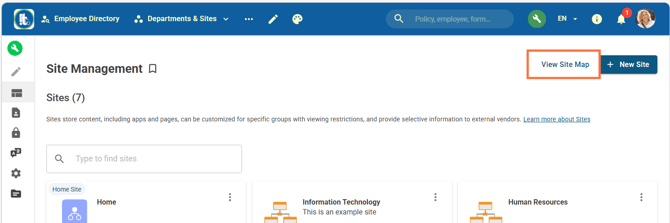
Site Map
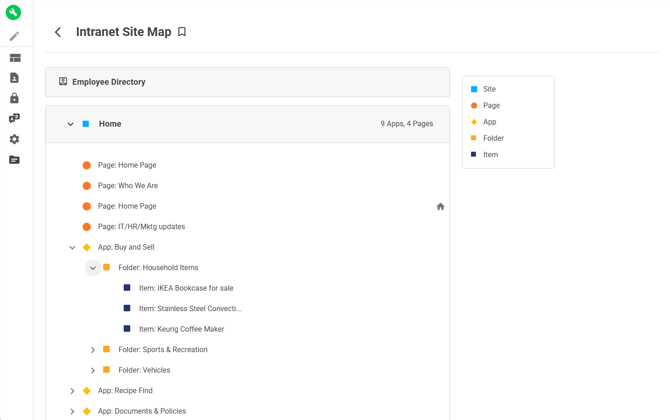
How the Site Map Works
The Site Map organizes your intranet into a clear structure:
- Sites (blue square)
- Sites are the largest content grouping
- Pages (orange circle)
- eg. Home Page, Who We Are
- Apps (yellow diamond)
- eg. Buy and Sell, Recipe Find, Documents & Policies
- Folders (orange square)
- eg. Household Items, Sports & Recreation, Vehicles
- Content Items (navy square)
- eg. Bookcase, Coffee Maker
Users can expand and collapse sections to drill down into specific content.
Key Capability: Direct Navigation
Instead of clicking through multiple layers manually, users can:
- Locate content visually
- Click directly into pages, apps, or items
- Jump straight to the exact resource they need
Watch the Site Map in action here.
Key Use Cases
1. Faster Content Discovery
The Site Map helps users quickly find information without needing to know exact navigation paths.
Example:
- Finding a specific article (e.g., “Holiday Hours”) becomes a direct search-and-click action rather than browsing multiple apps and folders.
This is especially useful for:
- New intranet admins
- Large or heavily structured intranets
- Organizations with multiple departments and content layers
2. Building Cross-Department Pages (Admin Efficiency)
One of the most powerful uses of the Site Map is for intranet administrators and content managers.
When creating pages with widgets (such as menus, calendars, app feeds, or photo galleries), the Site Map allows admins to:
- Browse the entire intranet structure in one view
- Select content from multiple departments without switching tabs
- Pull together content from different apps into a single page
- Configure widgets faster and more accurately
Example Scenario
An admin building a project hub page can:
- Add links from Marketing, IT, and HR in one place
- Combine calendars from multiple departments
- Aggregate news feeds across apps
- Pull photos from different teams into one gallery
This eliminates manual searching and reduces configuration time significantly.
Benefits for Intranet Administration
Using the Site Map improves intranet management in several ways:
1. Reduced Time Spent Searching for Content
Admins no longer need to click through multiple apps and folders to locate items.
2. Improved Accuracy
Visual structure reduces the risk of linking to the wrong page or outdated content.
3. Easier Cross-Team Collaboration
Content from different departments can be combined quickly into unified pages.
4. Faster Page and Widget Configuration
Widgets can be configured directly through the Site Map interface, streamlining setup.
5. Better Intranet Visibility
Admins gain a clearer understanding of how content is structured across the entire intranet.
Want to see the feature in action? Check out our webinar recording here.