
Highlights
Forms & Workflows
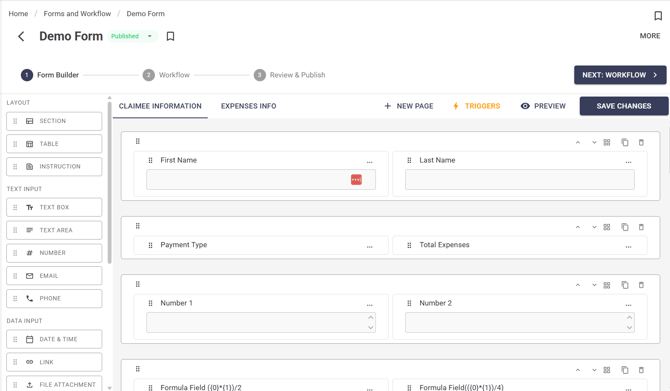
Forms & Workflows is now available in IC3, providing a powerful no-code solution for building forms, automating approvals, and managing notifications.
Users can create forms using a guided setup experience with flexible layouts, a rich library of field types, and built-in preview functionality. Workflows can route submissions through approval stages, trigger notifications, and automate actions based on form data.
For more in depth information on workflows & forms
Key capabilities include:
- Drag-and-drop form creation with sections, rows, columns, and pages.
- Support for text, email, date, time, file upload, dropdown, rating, checkbox, user data, and more.
- Formula fields for calculated values.
- Dynamic table fields for expense items and line-entry submissions.
- Conditional logic with AND/OR rule combinations.
- Multi-stage approval workflows with configurable approvers.
- Conditional approvers based on form values.
- Automated notifications delivered by email, in-app, or both.
- Workflow history, approval tracking, and submission comments.
- Draft and publish controls with scheduling options.
Analytics Dashboard
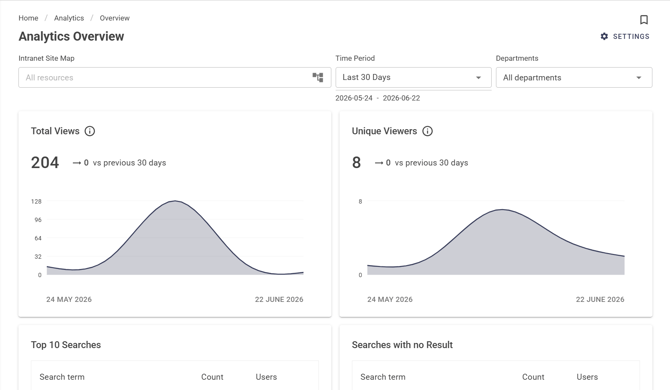
A new Analytics dashboard gives administrators insight into how employees interact with the intranet.
Track engagement across content, pages, apps, and searches through a centralized reporting experience.
Key capabilities include:
- Total Views and Unique Viewers reporting.
- Top search terms and searches with no results.
- Most and least viewed content.
- Homepage click tracking.
- Site, app, page, department, and location filtering.
- Time-based reporting for custom date ranges.
- CSV report exports.
Reactions & Comments
Increase engagement across the intranet with reactions, comments, likes, and threaded discussions.
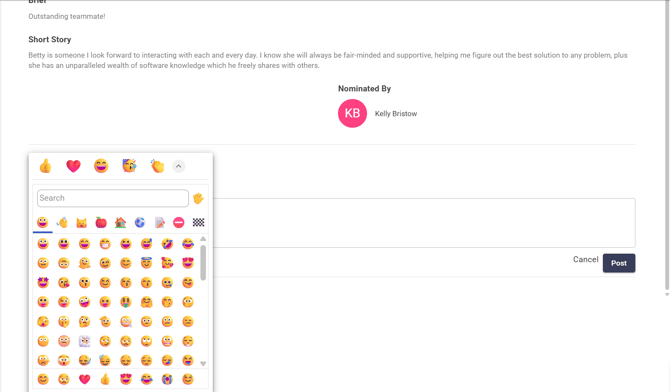
Users can react to content using emojis, participate in comment threads, and receive notifications when content they create receives engagement.
Key capabilities include:
- Emoji reactions with support for custom emojis.
- Live reaction counts and reaction breakdowns.
- Threaded comments and replies.
- Comment likes and notifications.
- Configurable reaction and comment settings.
- Support across Company News, App Feed, What's New, Photo Gallery, and other widgets.
Other Improvements
Forms & Workflow Experience
- Workflow history now provides detailed visibility into approval progress and stage status.
- Administrators can manually advance, reassign, or close workflow stages when required.
- Resubmission workflows allow users to update declined submissions and restart the approval process.
- Notifications can be sent to users, groups, managers, senior managers, and external email addresses.
- Automated workflow actions can skip, approve, reject, or redirect workflow stages.
Content & Collaboration
- Comments can now be added directly to form submissions.
- Notifications provide direct access to the relevant content, comment, or workflow item.
- Link-click tracking now captures additional context across navigation and widgets.
Analytics
- Enhanced reporting visibility across sites, apps, pages, and content.
- Improved tracking of search activity and content engagement.
- Export analytics data for additional reporting and analysis.
Bug Fixes
Theme Builder & Hero Banner
- Hero banners now scale proportionally on smaller screens while maintaining the correct aspect ratio.
- Updated mobile image dimension guidance within Theme Builder.
Content Editing
- Fixed an issue where Froala video alignment changes were not retained after publishing.
- Fixed fullscreen mode displaying code-view artifacts.
- Dragging images or videos into Froala now inserts the media instead of opening it in a new browser tab.
Folders & Documents
- Fixed an issue where the selected folder was not reflected correctly in the Move Folder dialog.
- Fixed the back navigation arrow in Documents apps.
Navigation & Links
- Resolved "link not found" errors affecting menu, app, site, and page links.
Search & Content
- Fixed an issue where content could disappear from content pages after performing an invalid keyword search.
Version History
- Fixed an issue where version history displayed "Unknown User" instead of the correct user name.
Coming Soon
The following enhancements are currently planned for future releases:
- Workflow templates for creating and reusing approval processes.
- A centralized Approvals view for managing pending approvals.
- Direct editing of submitted responses.
- Response export to CSV.
- Bulk actions for response management.
- Additional form types, including Surveys and Tests.