---
title: IC 3.0 Forms
description: Learn how to create, organize, and publish forms in IC 3.0 using sections, fields, conditional logic, triggers, and flexible layouts.
---
[Skip to content](https://learn.intranetconnections.com/ic-3.0-forms#main-content)

Open main navigation
Close main navigation
- [Contact Support](mailto:support@intranetconnections.com)
[Contact Support](mailto:support@intranetconnections.com)
How can we help you?
- There are no suggestions because the search field is empty.
1. [IC Knowledge Hub](https://learn.intranetconnections.com/?hsLang=en-ca)
2. [How To's](https://learn.intranetconnections.com/how-tos?hsLang=en-ca)
3. [Forms & Workflows](https://learn.intranetconnections.com/how-tos?hsLang=en-ca#forms-workflows)
# IC 3.0 Forms
## Forms is a powerful intranet tool which can simplify processes and increase the accuracy of information received.
#### In this article
**[Building a Form](https://learn.intranetconnections.com/ic-3.0-forms#building-a-form)**
**[Triggers & Conditional Logic](https://learn.intranetconnections.com/ic-3.0-forms#triggers-and-conditional-logic)**
**[Settings & Publish](https://learn.intranetconnections.com/ic-3.0-forms#settings-and-publish)**
**[Submitting a Form](https://learn.intranetconnections.com/ic-3.0-forms#submitting-a-form)**
**[View Responses](https://learn.intranetconnections.com/ic-3.0-forms#view-responses)**
[**Importing Forms Templates**](https://learn.intranetconnections.com/import-a-forms-template?hsLang=en-ca)
Learn about applying Workflows [here](https://learn.intranetconnections.com/ic-3.0-workflows?hsLang=en-ca).
#### Accessing Forms
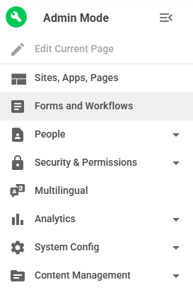
- Click on Admin mode
- Navigate to the left-hand side Admin panel
- Click Forms and Workflows
#### Organize Forms
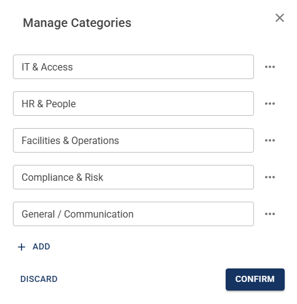
Categories can be used to group forms by type. For example, an HR Forms category can be used to house forms such as a New Employee Onboarding Form.
- Click on Manage Categories
#### Create a New Form
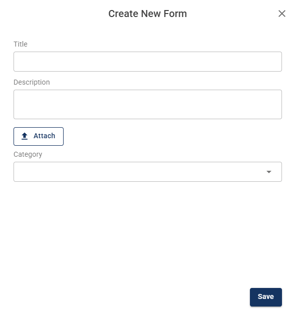
- Click on "+ Blank Form"
##### Guided Creation Flow
A three-step process walks you through every stage of building and publishing a form, so nothing gets missed.
##### Flexible Layout
Organise your form into logical groups using sections, rows, and columns to keep it easy to read and navigate.
### Building a Form
- Add a Section
- Add a Field
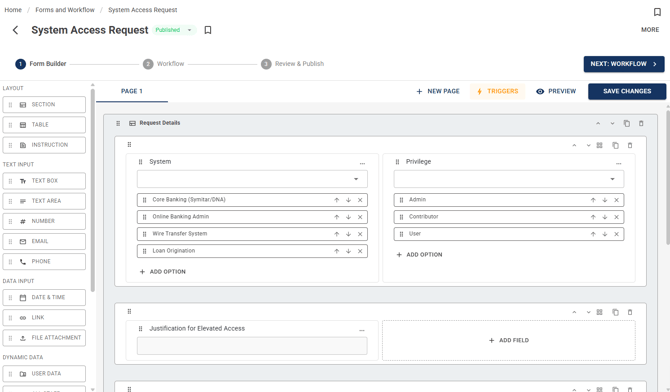
#### Form Field Types
- Layout
- Table
- A dedicated table field lets submitters add rows dynamically at submission time, making it easy to capture repeating data like expense items or line entries.
- Instructions
- Text Input
- Text Box
- Text Area
- Number
- Email
- Phone
- Data Input
- Date & Time
- Link
- File Attachment
- Dynamic Data
- User Data
- All Staff
- Selection & Options
- Dropdown
- Radio Button
- Check Box
- Toggle
- Advanced
- Formula
- Automatically compute a value from other fields in the form , for example, multiplying quantity by unit cost to calculate a total. Referenced fields are shown as chips in the formula editor.
##### Field Properties
Each field type has its own configurable properties so you can tailor exactly how it behaves.
##### Triggers & Conditional Logic
Show or hide fields and sections based on rules you define. Combine multiple conditions to build complex logic , for example, only show a manager approval field when the amount exceeds a threshold.
##### Preview before Publishing
See exactly how the form will appear to submitters before making it live, so you can catch layout or logic issues early.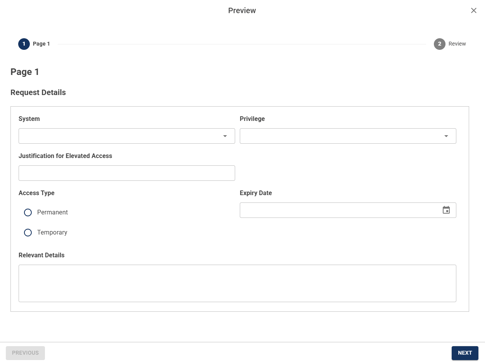
### Triggers & Conditional Logic
Add as many triggers as you want. There's no limit , add multiple triggers per field to cover every scenario your form needs to handle.
#### Field-based Rules
Set conditions on any form field using a wide range of operators.
- equals, does not equal, greater than, less than, contains, is empty, is not empty
#### Multi-logic
Combine multiple conditions with AND / OR logic to handle complex scenarios , like approval flows that depend on budget, role, and region all at once.
#### Stage Actions
Define what happens when conditions are met , show or hide any field or section to guide submitters through only what's relevant to them.
#### Centralised Trigger Manager
One place to see, edit, and manage every trigger across your entire form , with a clear view of which rules are attached to which field.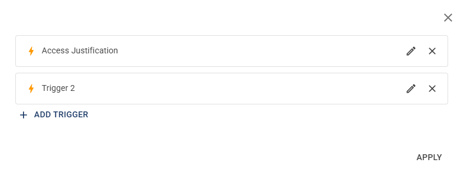
### **Settings & Publish**
#### Publishing & Form Status
- **Draft & Publish Control**
- Build and test your form privately in Draft mode, then publish it with one click when it's ready. Take it offline any time without losing your work.
- **Preview Before Publishing**
- See exactly what your form looks like to respondents before it goes live , no surprises.
- **Save Without Publishing**
- Make edits and save your progress at any time. Changes only go live when you choose to publish.
- **Make Form Offline**
- Take your form offline instantly, making it inaccessible to respondents. Republish anytime to bring it back online.
#### Form Behaviour
- **Anonymous Submissions**
- Let people submit without logging in , great for surveys, feedback, or external audiences.
- **Edit After Submission**
- Allow respondents to return and update their answers after submitting.
- **Submission Limits**
- Cap how many times a form can be submitted , per day, week, month, or in total.
### Submitting a Form
#### Submit a Form (The end-user experience)
- **Permission-based Access**
- Users only see and can submit forms they have been granted access to. Unpermissioned forms are not visible in their form directory.
- **Submission Flow**
- Users fill in the form fields and submit. Once submitted, the response is recorded and any configured workflow is triggered automatically.
#### Approver experience (What happens after a form is submitted)
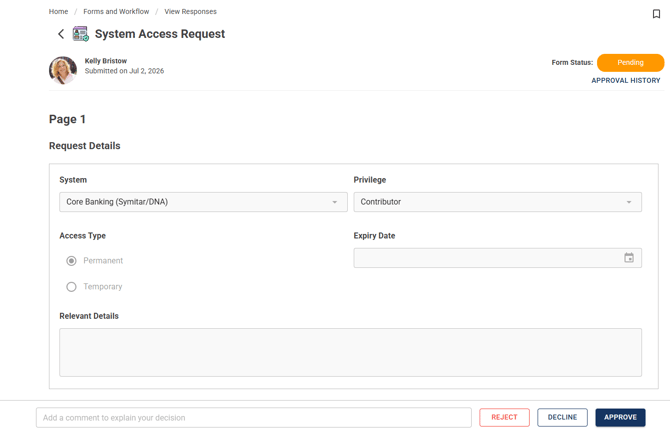
- **Approver Notifications**
- When a submission reaches an approver's stage, they receive a notification , in-app, by email, or both, depending on the workflow configuration.
- **Approver Actions**
- Approvers review the submitted form and choose one of the following actions.
- Approve, Decline, Reject
- **Add a Comment**
- Approvers can include a written comment alongside their decision to explain their reasoning or provide context to the submitter and other approvers in the workflow.
### View Responses
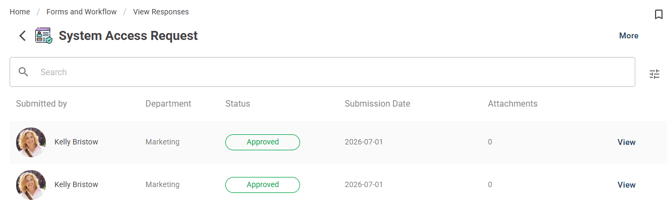
#### Responses Table
- Customise Your Columns
- Choose which fields appear as columns, reorder them, and rename them to match how your team talks about data.
- Search & Filter
- Search by keyword or filter by any field , status, submitter, date, or custom fields , to find exactly what you need fast.
#### Approvals & Actions
**Real-time Notifications**
- Get notified the moment something changes , a new submission, a stage approval, or a rejection.
**Want to see the feature in action? Check out our webinar recording [here.](https://youtu.be/M9FfyzsTVHs)**
- [FAQs](https://learn.intranetconnections.com/faqs?hsLang=en-ca#main-content)
- [AI](https://learn.intranetconnections.com/faqs?hsLang=en-ca#ai)
- [Onboarding & Setup](https://learn.intranetconnections.com/onboarding-setup?hsLang=en-ca#main-content)
- [Migration](https://learn.intranetconnections.com/onboarding-setup?hsLang=en-ca#migration)
- [Theme & Design](https://learn.intranetconnections.com/onboarding-setup?hsLang=en-ca#theme-design)
- [Installation](https://learn.intranetconnections.com/onboarding-setup?hsLang=en-ca#installation)
- [Product News](https://learn.intranetconnections.com/product-news?hsLang=en-ca#main-content)
- [Release Notes](https://learn.intranetconnections.com/product-news?hsLang=en-ca#release-notes)
- [Product Patches](https://learn.intranetconnections.com/product-news?hsLang=en-ca#product-patches)
- [Reports](https://learn.intranetconnections.com/reports?hsLang=en-ca#main-content)
- [Intranet Analytics](https://learn.intranetconnections.com/reports?hsLang=en-ca#intranet-analytics)
- [Integrations](https://learn.intranetconnections.com/integrations?hsLang=en-ca#main-content)
- [SharePoint](https://learn.intranetconnections.com/integrations?hsLang=en-ca#sharepoint)
- [AI](https://learn.intranetconnections.com/integrations?hsLang=en-ca#ai)
- [Support](https://learn.intranetconnections.com/support?hsLang=en-ca)
- [Technical Setup & Configuration](https://learn.intranetconnections.com/technical-setup-configuration?hsLang=en-ca#main-content)
- [Intranet Settings](https://learn.intranetconnections.com/technical-setup-configuration?hsLang=en-ca#intranet-settings)
- [Disaster Recovery](https://learn.intranetconnections.com/technical-setup-configuration?hsLang=en-ca#disaster-recovery)
- [Advanced Configuration](https://learn.intranetconnections.com/technical-setup-configuration?hsLang=en-ca#advanced-configuration)
- [How To's](https://learn.intranetconnections.com/how-tos?hsLang=en-ca#main-content)
- [Multilingual](https://learn.intranetconnections.com/how-tos?hsLang=en-ca#multilingual)
- [Navigation](https://learn.intranetconnections.com/how-tos?hsLang=en-ca#navigation)
- [Intranet Architecture](https://learn.intranetconnections.com/how-tos?hsLang=en-ca#intranet-architecture)
- [Security & Permissions](https://learn.intranetconnections.com/how-tos?hsLang=en-ca#security-permissions)
- [Private Cloud](https://learn.intranetconnections.com/how-tos?hsLang=en-ca#private-cloud)
- [Feature Requests](https://learn.intranetconnections.com/how-tos?hsLang=en-ca#feature-requests)
- [Forms & Workflows](https://learn.intranetconnections.com/how-tos?hsLang=en-ca#forms-workflows)
- [Your Guide to Transitioning to IC 3.0](https://learn.intranetconnections.com/how-tos?hsLang=en-ca#your-guide-to-transitioning-to-ic-3-0)
- [Best Practices](https://learn.intranetconnections.com/best-practices?hsLang=en-ca#main-content)
- [Design](https://learn.intranetconnections.com/best-practices?hsLang=en-ca#design)
- [Getting Started](https://learn.intranetconnections.com/best-practices?hsLang=en-ca#getting-started)
- [Applications](https://learn.intranetconnections.com/applications?hsLang=en-ca#main-content)
- [Documents](https://learn.intranetconnections.com/applications?hsLang=en-ca#documents)
- [Internal Resources](https://learn.intranetconnections.com/applications?hsLang=en-ca#internal-resources)
- [Announcements](https://learn.intranetconnections.com/applications?hsLang=en-ca#announcements)
- [Engagement](https://learn.intranetconnections.com/applications?hsLang=en-ca#engagement)
- [Advertising](https://learn.intranetconnections.com/applications?hsLang=en-ca#advertising)
- [Account & Support](https://learn.intranetconnections.com/account-support?hsLang=en-ca#main-content)
- [Our Services](https://learn.intranetconnections.com/account-support?hsLang=en-ca#our-services)
- [Security](https://learn.intranetconnections.com/security?hsLang=en-ca#main-content)
- [Security News & Updates](https://learn.intranetconnections.com/security?hsLang=en-ca#security-news-updates)
- [Widgets](https://learn.intranetconnections.com/widgets?hsLang=en-ca#main-content)
- [What's New Feed](https://learn.intranetconnections.com/widgets?hsLang=en-ca#whats-new-feed)
- [Content & Media Widgets](https://learn.intranetconnections.com/widgets?hsLang=en-ca#content-media-widgets)
- [Engagement Widgets](https://learn.intranetconnections.com/widgets?hsLang=en-ca#engagement-widgets)
[](https://intranetconnections.com)
Copyright © 2025, Intranet Connections
```json
{
"@context" : "https://schema.org",
"@type" : "VideoObject",
"contentUrl" : "https://7578106.fs1.hubspotusercontent-na1.net/hubfs/7578106/video_assets/216435669859/inherited/web_optimized.mp4",
"dateModified" : "2026-07-03T15:17:00.092Z",
"duration" : "PT2M21S",
"height" : 1080,
"name" : "IC 3.0 Forms",
"thumbnailUrl" : "https://7578106.fs1.hubspotusercontent-na1.net/hubfs/7578106/IC%203.0%20Forms.mp4/medium.jpg",
"uploadDate" : "2026-07-03T15:16:44.202Z",
"width" : 1920
}
```