---
title: IC 3.0 Global Navigation
description: Learn how to edit and manage your Global Navigation.
---

[Skip to content](https://learn.intranetconnections.com/global-navigation#main-content)

![New White Logo-1](https://learn.intranetconnections.com/hs-fs/hubfs/New%20White%20Logo-1.png?width=200&height=58&name=New%20White%20Logo-1.png)

Open main navigation

Close main navigation

- [Contact Support](mailto:support@intranetconnections.com)

[Contact Support](mailto:support@intranetconnections.com)

 How can we help you?

- There are no suggestions because the search field is empty.

1. [IC Knowledge Hub](https://learn.intranetconnections.com/?hsLang=en-ca)
2. [How To's](https://learn.intranetconnections.com/how-tos?hsLang=en-ca)
3. [Intranet Architecture](https://learn.intranetconnections.com/how-tos?hsLang=en-ca#intranet-architecture)

# IC 3.0 Global Navigation

## Editing top navigation

<iframe data-hsv-src="https://play.hubspotvideo.com/v/7578106/id/215690400819" referrerpolicy="origin" sandbox="allow-forms allow-scripts allow-same-origin allow-popups" allow="autoplay; fullscreen;" style="position: absolute !important; width: 100% !important; height: 100% !important; left: 0; top: 0; border: 0 none; pointer-events: initial" title="HubSpot Video" loading="lazy" data-hsv-id="215690400819" data-hsv-style="" data-hsv-width="1920" data-hsv-height="1080" data-hsv-autoplay="false" data-hsv-loop="false" data-hsv-muted="false" data-hsv-hidden-controls="false" data-hsv-full-width="false"></iframe>


1\. Go to admin mode.

![Go to admin mode.](https://images.tango.us/workflows/89fb06ad-893c-4d28-9c47-1998a168173f/steps/ec3cbeeb-45a0-48cd-9cf7-2b38830c5731/88077441-d6e1-4182-aa6f-2e696e96e1ae.png?fm=png&crop=focalpoint&fit=crop&fp-x=0.5000&fp-y=0.5000&w=1200&border=2%2CF4F2F7&border-radius=8%2C8%2C8%2C8&border-radius-inner=8%2C8%2C8%2C8&blend-align=bottom&blend-mode=normal&blend-x=0&blend-w=1200&blend64=aHR0cHM6Ly9pbWFnZXMudGFuZ28udXMvc3RhdGljL21hZGUtd2l0aC10YW5nby13YXRlcm1hcmstdjIucG5n&mark-x=1106&mark-y=2&m64=aHR0cHM6Ly9pbWFnZXMudGFuZ28udXMvc3RhdGljL2JsYW5rLnBuZz9tYXNrPWNvcm5lcnMmYm9yZGVyPTQlMkNGRjc0NDImdz00NyZoPTQ3JmZpdD1jcm9wJmNvcm5lci1yYWRpdXM9MTA%3D)


2\. On top navigation bar, click on edit icon.

![On top navigation bar, click on edit icon.](https://images.tango.us/workflows/89fb06ad-893c-4d28-9c47-1998a168173f/steps/f100487f-b8c2-4ca7-8e0c-b136c25feeb7/ec1b5715-3d52-4a99-9ad9-b7cbf1b4dfa5.png?fm=png&crop=focalpoint&fit=crop&fp-x=0.5000&fp-y=0.5000&w=1200&border=2%2CF4F2F7&border-radius=8%2C8%2C8%2C8&border-radius-inner=8%2C8%2C8%2C8&blend-align=bottom&blend-mode=normal&blend-x=0&blend-w=1200&blend64=aHR0cHM6Ly9pbWFnZXMudGFuZ28udXMvc3RhdGljL21hZGUtd2l0aC10YW5nby13YXRlcm1hcmstdjIucG5n&mark-x=725&mark-y=3&m64=aHR0cHM6Ly9pbWFnZXMudGFuZ28udXMvc3RhdGljL2JsYW5rLnBuZz9tYXNrPWNvcm5lcnMmYm9yZGVyPTQlMkNGRjc0NDImdz0zOSZoPTM5JmZpdD1jcm9wJmNvcm5lci1yYWRpdXM9MTA%3D)

3\. You have to up to 7 main menu items and three levels in total. We suggest you map out your top navigation bar ahead.

![You have to up to 7 main (Level 1) menu items and three levels in total. We suggest you to map out your top navigation bar ahead. Use "More" for relatively unimportant information.](https://images.tango.us/workflows/89fb06ad-893c-4d28-9c47-1998a168173f/steps/d87c6a41-5ad8-4f27-89d6-f47405d844e9/aae17180-19cf-4fe5-b9d6-33242e412349.png?fm=png&crop=focalpoint&fit=crop&fp-x=0.5186&fp-y=0.1778&fp-z=1.0433&w=1200&border=2%2CF4F2F7&border-radius=8%2C8%2C8%2C8&border-radius-inner=8%2C8%2C8%2C8&blend-align=bottom&blend-mode=normal&blend-x=0&blend-w=1200&blend64=aHR0cHM6Ly9pbWFnZXMudGFuZ28udXMvc3RhdGljL21hZGUtd2l0aC10YW5nby13YXRlcm1hcmstdjIucG5n&mark-x=3&mark-y=154&m64=aHR0cHM6Ly9pbWFnZXMudGFuZ28udXMvc3RhdGljL2JsYW5rLnBuZz9tYXNrPWNvcm5lcnMmYm9yZGVyPTYlMkNGRjc0NDImdz0xMTk1Jmg9MjAmZml0PWNyb3AmY29ybmVyLXJhZGl1cz0xMA%3D%3D)

4\. You can drag and drop the items within each level to change order.

![You can drag and drop the items within each level to change order.](https://images.tango.us/workflows/89fb06ad-893c-4d28-9c47-1998a168173f/steps/35ff920a-d555-4d21-9ae4-9a463333d1b7/3b630c33-6c6a-4965-bb3d-7e530a176044.png?fm=png&crop=focalpoint&fit=crop&fp-x=0.3942&fp-y=0.4017&fp-z=1.3706&w=1200&border=2%2CF4F2F7&border-radius=8%2C8%2C8%2C8&border-radius-inner=8%2C8%2C8%2C8&blend-align=bottom&blend-mode=normal&blend-x=0&blend-w=1200&blend64=aHR0cHM6Ly9pbWFnZXMudGFuZ28udXMvc3RhdGljL21hZGUtd2l0aC10YW5nby13YXRlcm1hcmstdjIucG5n&mark-x=216&mark-y=221&m64=aHR0cHM6Ly9pbWFnZXMudGFuZ28udXMvc3RhdGljL2JsYW5rLnBuZz9tYXNrPWNvcm5lcnMmYm9yZGVyPTYlMkNGRjc0NDImdz0yMDAmaD01MyZmaXQ9Y3JvcCZjb3JuZXItcmFkaXVzPTEw)


5\. To add new navigation item, click on the level where you want to add item, and click (+) add button. Here is an example of adding a Level 1 item.

![To add new navigation item, click on the level where you want to add item, and click add button. Here is an example of adding a Level 1 item.](https://images.tango.us/workflows/89fb06ad-893c-4d28-9c47-1998a168173f/steps/911e514b-e134-48cc-8428-84b17ce4229f/6286e921-04dd-4de8-824a-7fecbe08b71b.png?fm=png&crop=focalpoint&fit=crop&fp-x=0.5000&fp-y=0.5000&w=1200&border=2%2CF4F2F7&border-radius=8%2C8%2C8%2C8&border-radius-inner=8%2C8%2C8%2C8&blend-align=bottom&blend-mode=normal&blend-x=0&blend-w=1200&blend64=aHR0cHM6Ly9pbWFnZXMudGFuZ28udXMvc3RhdGljL21hZGUtd2l0aC10YW5nby13YXRlcm1hcmstdjIucG5n&mark-x=753&mark-y=194&m64=aHR0cHM6Ly9pbWFnZXMudGFuZ28udXMvc3RhdGljL2JsYW5rLnBuZz9tYXNrPWNvcm5lcnMmYm9yZGVyPTQlMkNGRjc0NDImdz0zOSZoPTM5JmZpdD1jcm9wJmNvcm5lci1yYWRpdXM9MTA%3D)


6\. On the right panel that pops up, you can edit name, link, sub item, icon, etc.

![On the right panel that pops up, you can edit name, link, sub item, icon, etc.](https://images.tango.us/workflows/89fb06ad-893c-4d28-9c47-1998a168173f/steps/870f85b9-95f3-4cf5-8705-a66350a91883/f87518a4-177d-4829-84e5-b39350e6aad4.png?fm=png&crop=focalpoint&fit=crop&fp-x=0.7579&fp-y=0.2569&fp-z=1.9638&w=1200&border=2%2CF4F2F7&border-radius=8%2C8%2C8%2C8&border-radius-inner=8%2C8%2C8%2C8&blend-align=bottom&blend-mode=normal&blend-x=0&blend-w=1200&blend64=aHR0cHM6Ly9pbWFnZXMudGFuZ28udXMvc3RhdGljL21hZGUtd2l0aC10YW5nby13YXRlcm1hcmstdjIucG5n&mark-x=831&mark-y=131&m64=aHR0cHM6Ly9pbWFnZXMudGFuZ28udXMvc3RhdGljL2JsYW5rLnBuZz9tYXNrPWNvcm5lcnMmYm9yZGVyPTYlMkNGRjc0NDImdz0zMjkmaD02NSZmaXQ9Y3JvcCZjb3JuZXItcmFkaXVzPTEw)

7\. To add sub Item, click on the radio button "sub item".

![To add sub Item, click on the radio button "sub item".](https://images.tango.us/workflows/89fb06ad-893c-4d28-9c47-1998a168173f/steps/8aa36473-44f4-42ce-b56b-2cb58bd4e215/b0e60f34-bfab-47d9-813c-7b46081cee1a.png?fm=png&crop=focalpoint&fit=crop&fp-x=0.8532&fp-y=0.2287&fp-z=2.9099&w=1200&border=2%2CF4F2F7&border-radius=8%2C8%2C8%2C8&border-radius-inner=8%2C8%2C8%2C8&blend-align=bottom&blend-mode=normal&blend-x=0&blend-w=1200&blend64=aHR0cHM6Ly9pbWFnZXMudGFuZ28udXMvc3RhdGljL21hZGUtd2l0aC10YW5nby13YXRlcm1hcmstdjIucG5n&mark-x=631&mark-y=387&m64=aHR0cHM6Ly9pbWFnZXMudGFuZ28udXMvc3RhdGljL2JsYW5rLnBuZz9tYXNrPWNvcm5lcnMmYm9yZGVyPTYlMkNGRjc0NDImdz0xMTMmaD0xMTMmZml0PWNyb3AmY29ybmVyLXJhZGl1cz0xMA%3D%3D)

8\. You will see a drop down with "New Sub Item". Click on it and add details on the right panel.

![You will see a drop down with "New Sub Item". Click on it and add details on the right panel.](https://images.tango.us/workflows/89fb06ad-893c-4d28-9c47-1998a168173f/steps/225eebd8-e626-48d1-8d79-3e94e4e87284/ab759a01-c297-4381-8555-82491cedd868.png?fm=png&crop=focalpoint&fit=crop&fp-x=0.6291&fp-y=0.3646&fp-z=1.8142&w=1200&border=2%2CF4F2F7&border-radius=8%2C8%2C8%2C8&border-radius-inner=8%2C8%2C8%2C8&blend-align=bottom&blend-mode=normal&blend-x=0&blend-w=1200&blend64=aHR0cHM6Ly9pbWFnZXMudGFuZ28udXMvc3RhdGljL21hZGUtd2l0aC10YW5nby13YXRlcm1hcmstdjIucG5n&mark-x=659&mark-y=324&m64=aHR0cHM6Ly9pbWFnZXMudGFuZ28udXMvc3RhdGljL2JsYW5rLnBuZz9tYXNrPWNvcm5lcnMmYm9yZGVyPTYlMkNGRjc0NDImdz0xMjAmaD00MCZmaXQ9Y3JvcCZjb3JuZXItcmFkaXVzPTEw)

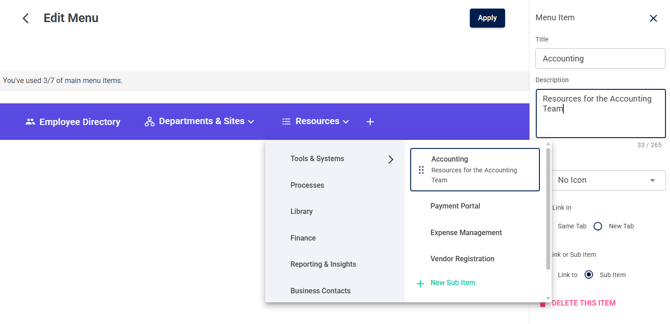
9\. You can add descriptions to menu items in the Description box.
![](https://learn.intranetconnections.com/hs-fs/hubfs/image-png-Jun-22-2026-08-16-08-1550-PM.png?width=670&height=324&name=image-png-Jun-22-2026-08-16-08-1550-PM.png)

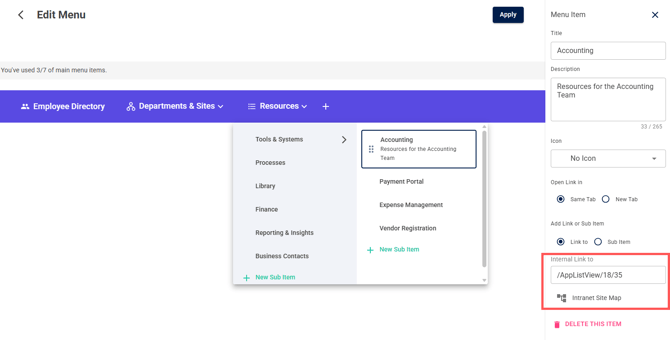
10\. To link content from your intranet, utilize the Site Map to select. 
![](https://learn.intranetconnections.com/hs-fs/hubfs/image-png-Jun-22-2026-09-01-09-3875-PM.png?width=670&height=340&name=image-png-Jun-22-2026-09-01-09-3875-PM.png)

11\. When everything is done, click on APPLY to save changes.

![When everything is done, click on APPLY. We do not save any edit without applying for now. ](https://images.tango.us/workflows/89fb06ad-893c-4d28-9c47-1998a168173f/steps/c99e1e90-e6c7-4936-9218-6457c1b99c83/eae692be-d79e-4096-8b34-821435ed553f.png?fm=png&crop=focalpoint&fit=crop&fp-x=0.7984&fp-y=0.0941&fp-z=2.9820&w=1200&border=2%2CF4F2F7&border-radius=8%2C8%2C8%2C8&border-radius-inner=8%2C8%2C8%2C8&blend-align=bottom&blend-mode=normal&blend-x=0&blend-w=1200&blend64=aHR0cHM6Ly9pbWFnZXMudGFuZ28udXMvc3RhdGljL21hZGUtd2l0aC10YW5nby13YXRlcm1hcmstdjIucG5n&mark-x=514&mark-y=202&m64=aHR0cHM6Ly9pbWFnZXMudGFuZ28udXMvc3RhdGljL2JsYW5rLnBuZz9tYXNrPWNvcm5lcnMmYm9yZGVyPTYlMkNGRjc0NDImdz0xNzImaD05NCZmaXQ9Y3JvcCZjb3JuZXItcmFkaXVzPTEw)


Learn how to use the [Site Map](https://learn.intranetconnections.com/intranet-site-map?hsLang=en-ca) for quick menu building.


- [FAQs](https://learn.intranetconnections.com/faqs?hsLang=en-ca#main-content)

    - [AI](https://learn.intranetconnections.com/faqs?hsLang=en-ca#ai)
- [Onboarding & Setup](https://learn.intranetconnections.com/onboarding-setup?hsLang=en-ca#main-content)

    - [Migration](https://learn.intranetconnections.com/onboarding-setup?hsLang=en-ca#migration)
    - [Theme & Design](https://learn.intranetconnections.com/onboarding-setup?hsLang=en-ca#theme-design)
    - [Installation](https://learn.intranetconnections.com/onboarding-setup?hsLang=en-ca#installation)
- [Product News](https://learn.intranetconnections.com/product-news?hsLang=en-ca#main-content)

    - [Release Notes](https://learn.intranetconnections.com/product-news?hsLang=en-ca#release-notes)
    - [Product Patches](https://learn.intranetconnections.com/product-news?hsLang=en-ca#product-patches)
- [Reports](https://learn.intranetconnections.com/reports?hsLang=en-ca#main-content)

    - [Intranet Analytics](https://learn.intranetconnections.com/reports?hsLang=en-ca#intranet-analytics)
- [Integrations](https://learn.intranetconnections.com/integrations?hsLang=en-ca#main-content)

    - [SharePoint](https://learn.intranetconnections.com/integrations?hsLang=en-ca#sharepoint)
    - [AI](https://learn.intranetconnections.com/integrations?hsLang=en-ca#ai)
- [Support](https://learn.intranetconnections.com/support?hsLang=en-ca)
- [Technical Setup & Configuration](https://learn.intranetconnections.com/technical-setup-configuration?hsLang=en-ca#main-content)

    - [Intranet Settings](https://learn.intranetconnections.com/technical-setup-configuration?hsLang=en-ca#intranet-settings)
    - [Disaster Recovery](https://learn.intranetconnections.com/technical-setup-configuration?hsLang=en-ca#disaster-recovery)
    - [Advanced Configuration](https://learn.intranetconnections.com/technical-setup-configuration?hsLang=en-ca#advanced-configuration)
- [How To's](https://learn.intranetconnections.com/how-tos?hsLang=en-ca#main-content)

    - [Multilingual](https://learn.intranetconnections.com/how-tos?hsLang=en-ca#multilingual)
    - [Navigation](https://learn.intranetconnections.com/how-tos?hsLang=en-ca#navigation)
    - [Intranet Architecture](https://learn.intranetconnections.com/how-tos?hsLang=en-ca#intranet-architecture)
    - [Security & Permissions](https://learn.intranetconnections.com/how-tos?hsLang=en-ca#security-permissions)
    - [Private Cloud](https://learn.intranetconnections.com/how-tos?hsLang=en-ca#private-cloud)
    - [Feature Requests](https://learn.intranetconnections.com/how-tos?hsLang=en-ca#feature-requests)
    - [Forms & Workflows](https://learn.intranetconnections.com/how-tos?hsLang=en-ca#forms-workflows)
    - [Your Guide to Transitioning to IC 3.0](https://learn.intranetconnections.com/how-tos?hsLang=en-ca#your-guide-to-transitioning-to-ic-3-0)
- [Best Practices](https://learn.intranetconnections.com/best-practices?hsLang=en-ca#main-content)

    - [Design](https://learn.intranetconnections.com/best-practices?hsLang=en-ca#design)
    - [Getting Started](https://learn.intranetconnections.com/best-practices?hsLang=en-ca#getting-started)
- [Applications](https://learn.intranetconnections.com/applications?hsLang=en-ca#main-content)

    - [Documents](https://learn.intranetconnections.com/applications?hsLang=en-ca#documents)
    - [Internal Resources](https://learn.intranetconnections.com/applications?hsLang=en-ca#internal-resources)
    - [Announcements](https://learn.intranetconnections.com/applications?hsLang=en-ca#announcements)
    - [Engagement](https://learn.intranetconnections.com/applications?hsLang=en-ca#engagement)
    - [Advertising](https://learn.intranetconnections.com/applications?hsLang=en-ca#advertising)
- [Account & Support](https://learn.intranetconnections.com/account-support?hsLang=en-ca#main-content)

    - [Our Services](https://learn.intranetconnections.com/account-support?hsLang=en-ca#our-services)
- [Security](https://learn.intranetconnections.com/security?hsLang=en-ca#main-content)

    - [Security News & Updates](https://learn.intranetconnections.com/security?hsLang=en-ca#security-news-updates)
- [Widgets](https://learn.intranetconnections.com/widgets?hsLang=en-ca#main-content)

    - [What's New Feed](https://learn.intranetconnections.com/widgets?hsLang=en-ca#whats-new-feed)
    - [Content & Media Widgets](https://learn.intranetconnections.com/widgets?hsLang=en-ca#content-media-widgets)
    - [Engagement Widgets](https://learn.intranetconnections.com/widgets?hsLang=en-ca#engagement-widgets)

[![ic-chatbot-logo](https://learn.intranetconnections.com/hs-fs/hubfs/Logos%20and%20Icons/ic-chatbot-logo.png?width=100&height=100&name=ic-chatbot-logo.png "ic-chatbot-logo")](https://intranetconnections.com)

<https://www.linkedin.com/company/intranet-connections> <https://www.instagram.com/intranetconnections> <https://www.facebook.com/intranetconnections> <https://www.twitter.com/intranettips>

Copyright © 2025, Intranet Connections

```json
{
  "@context" : "https://schema.org",
  "@type" : "VideoObject",
  "contentUrl" : "https://7578106.fs1.hubspotusercontent-na1.net/hubfs/7578106/video_assets/215690558389/inherited/web_optimized.mp4",
  "dateModified" : "2026-06-23T21:42:04.216Z",
  "duration" : "PT1M47S",
  "height" : 1080,
  "name" : "IC 3.0 Global Navigation",
  "thumbnailUrl" : "https://7578106.fs1.hubspotusercontent-na1.net/hubfs/7578106/IC%203.0%20Global%20Navigation.mp4/medium.jpg",
  "uploadDate" : "2026-06-23T21:41:54.702Z",
  "width" : 1920
}
```