---
title: Events Calendar
description: Use the IC 3.0 Events Calendar to post upcoming events, improve engagement, and keep employees informed with clear scheduling and event details.
---
[Skip to content](https://learn.intranetconnections.com/events-calendar#main-content)
Open main navigation
Close main navigation
- [Contact Support](mailto:support@intranetconnections.com)
[Contact Support](mailto:support@intranetconnections.com)
How can we help you?
- There are no suggestions because the search field is empty.
1. [IC Knowledge Hub](https://learn.intranetconnections.com/?hsLang=en-ca)
2. [Applications](https://learn.intranetconnections.com/applications?hsLang=en-ca)
3. [Internal Resources](https://learn.intranetconnections.com/applications?hsLang=en-ca#internal-resources)
# Events Calendar
## The Events Calendar application shows the view of all staff events, or specific types of events or team events.
#### **Build Your Events Calendar**
Start by following the process to [add an App to a site](https://learn.intranetconnections.com/sites-0-0?hsLang=en-ca).

Once you have the App in place, click on the three columns on the App Card to explore available customizations. To open the App, click 'Go to App'
To set up Microsoft Calendar sync, refer to this [step-by-step guide](https://learn.intranetconnections.com/adding-calendar-api-permission-for-microsoft-graph-in-azure-portal?hsLang=en-ca).
#### Also in this article
**[Adding Training Sessions](https://learn.intranetconnections.com/events-calendar#training-sessions)**
#### **Default Events Calendar Layout**
The Events Calendar comes with a standard layout with a few customization options available.
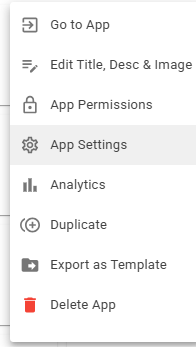
**Click 'Go to App' and for more settings, 'Calendar Settings'**
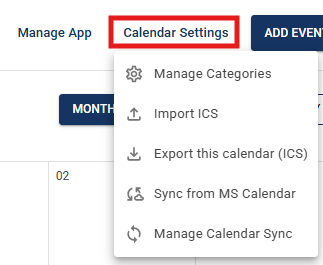
**Add New Event**
To add a new event, click **Add Event**, then enter the event details using the customization options below. You can also select a different category before publishing. You can also set recurring events.
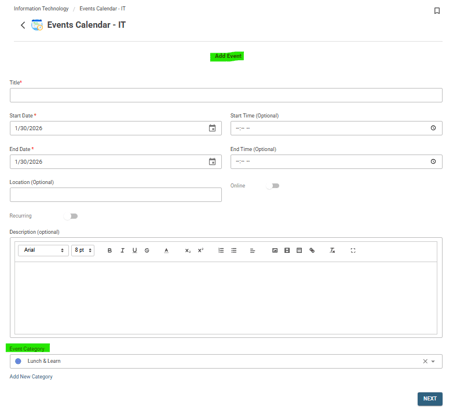
**Click Add Event on the content page, scroll down to 'Add Category' to manage categories**
**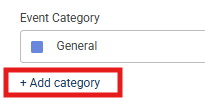 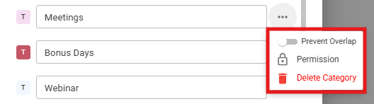**
#### **Add, Edit & Delete Events Calendar App Permissions**
Edit 'View Content', Add Content, Edit 'Other's Content' & Delete 'Other's Content'**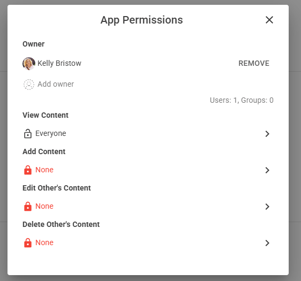**
#### **App Settings**
Toggle Advertising Options
**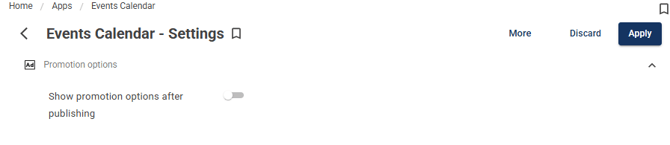**
#### **Export App Template**
Customized App template can be exported and imported in a different site
**To import:** Open Site Card \> Apps \> Create App from Template \> Import Template \> Selected downloaded template to import
#### **Promote Items**
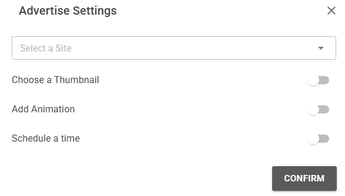
Ensure Advertising Options has been turned on.
Create New content, click publish and customize advertising pop up.
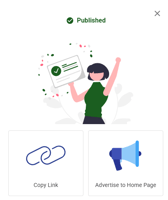 \> 
To see details on the What's New feed widget, click [here](https://learn.intranetconnections.com/whats-new-feed-widget?hsLang=en-ca). To see details on the Story Board, click [here](https://learn.intranetconnections.com/storyboard?hsLang=en-ca).
#### Display the Events Calendar app in a Widget
Use Calendar feed widget to add the Events Calendar application to your homepage
Add Widget \> Calendar feed \> Select Source App \> Select Category
**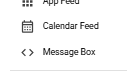 \> 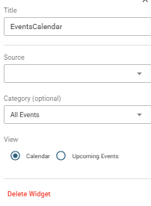 \> 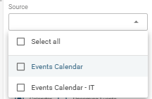 \> 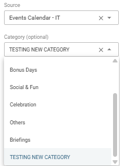**
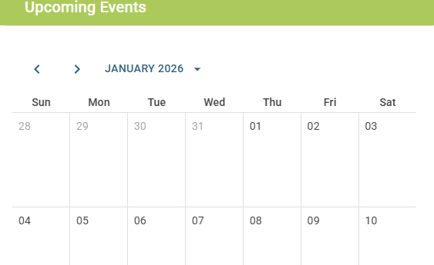
#### **Events Calendar Widget Display**
- Title can be customized
- You can also change category previewed on the calendar view**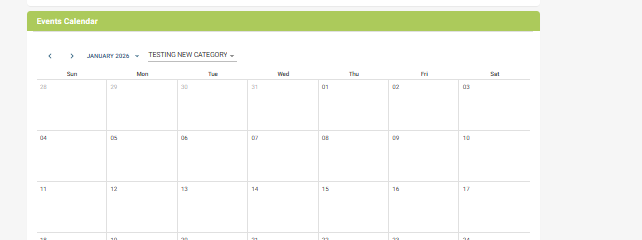**
**Calendar View:**
****
**Upcoming Events View: (List View)**
**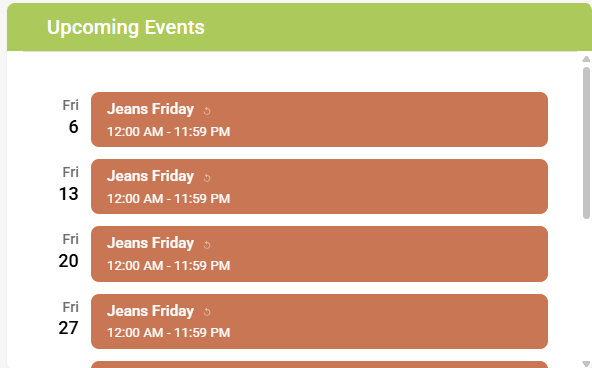**
### **Training Sessions**
A Training Session is an event in the Events Calendar that adds enrollment, a roster and attendance tracking to a regular calendar event. Customers use it for onboarding, compliance training, workshops, wellness classes and multi-part courses.
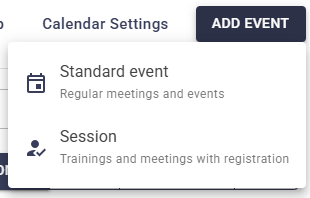
The calendar has two event types: a **Standard event** (a regular meeting or event) and a **Session** (a training or meeting with registration).
| **Concept** | **What it means** | **Notes** |
| --- | --- | --- |
| One registration for all sessions | One registration covers every date. One registrant list for the whole session. | Use for courses and multi-part programs. Admins can register people or groups. |
| Separate registration per session | Every date has its own registration and its own registrant list. | Use for drop-in classes such as Lunch Yoga. Self-registration only. |
| Capacity | The number of spots. Empty means no limit. | Per session for one registration; per date for separate registration. |
| Instructor / Facilitator | The person running the session. Can be an intranet user or an external email. | Not counted as a registrant. Gets registration and cancellation notifications. |
| Invite required registrants | People or groups the admin registers automatically. | Only for one registration for all sessions. |
| Allow self-registration | Anyone who can view the category can register from the event page. | On by default. |
| Registrants can cancel | Registered people see a Cancel registration link until the session starts. | On by default. |
The registration type and the event type (Standard event or Session) cannot be changed after publishing.
#### How to add a session
An admin adds a session from **Add Event \> Session**, fills in the details and clicks **Publish**. Only people with Add Content permissions for the Events Calendar can add sessions to it.
1. Click **Add Event** and choose **Session**. You can also click a day on the calendar and pick Session from the popup window.
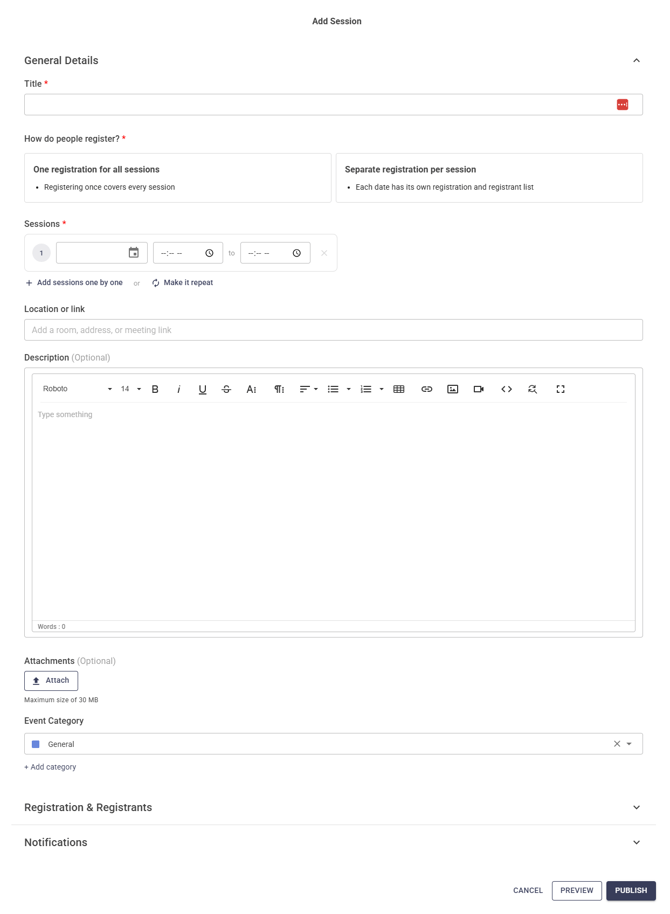
2. In **General Details**, enter the session title, choose how people register, set the date and time, and pick a category. Location, description and attachments are optional.
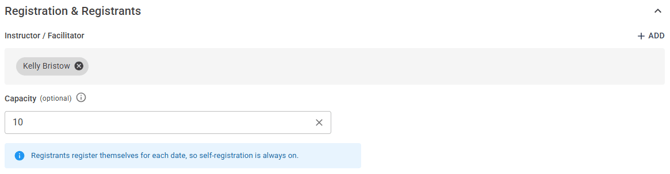
3. Open **Registration & Registrants**. Add the instructor or facilitator, set the capacity, and choose who is registered. With one registration for all sessions, you can invite required registrants and turn self-registration and cancellation on or off.
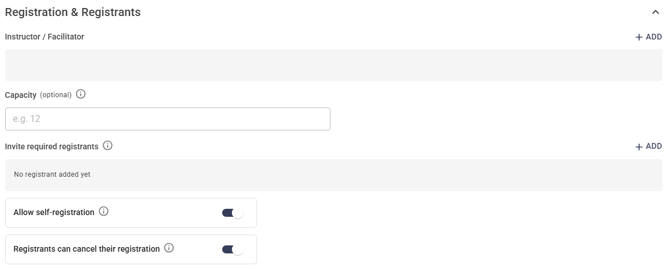
\- With separate registration per session, people always register themselves for each date.
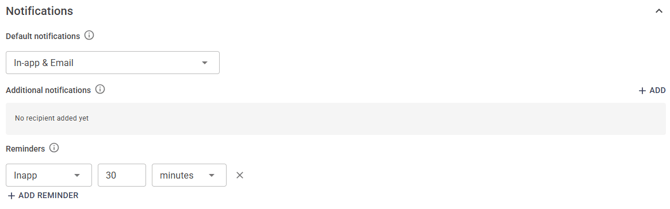
4. Open **Notifications**. Choose how default notifications are delivered (In-app, Email, or In-app & Email). Optionally add people who should also get registration and cancellation notifications, and set up to 3 reminders.
5. Click **Preview** to check the session page, then **Publish**.
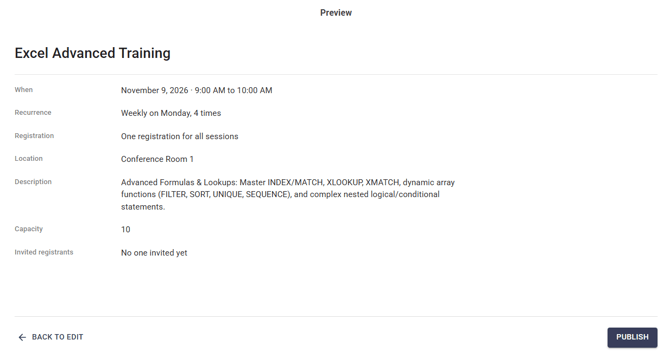
- Required fields are the title, registration type, at least one date with start and end time, and the category. If a required field is empty, Publish highlights it in red and opens its panel.
#### Recurring sessions and multi-part courses
- A session can have more than one date in two ways: **Make it repeat** (a pattern) or **Add sessions one by one** (any dates). You can use one or the other, not both.
- **Make it repeat** opens the same recurrence window as standard events. Set how often it repeats, on which days, and when it ends.
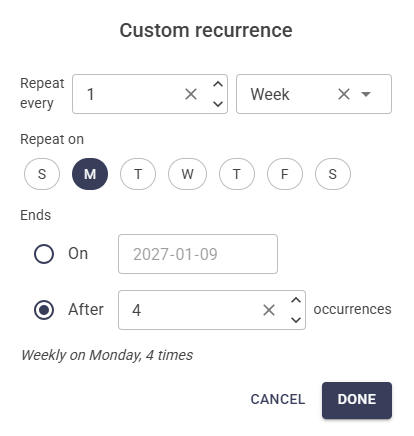
- After you click Done, the rule is displayed under the date and time. Click on it to edit or click on the x to remove it.
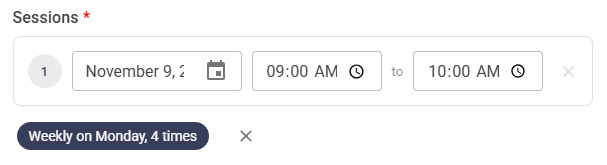
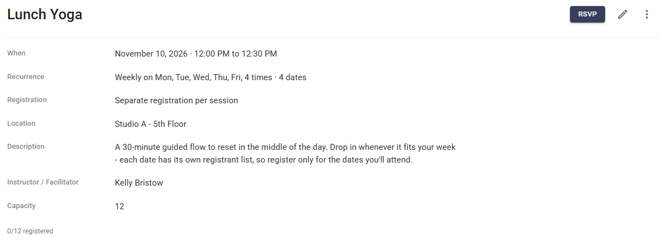
How the dates behave depends on the registration type:
- **Drop-in series** (separate registration per session), for example Lunch Yoga. Each date has its own registrant list and capacity. People register only for the dates they attend.
- **Course** (one registration for all sessions), for example a 4-part Healthy Living Course. One registration covers every part. On the calendar each part shows its number, such as "(1/4)".
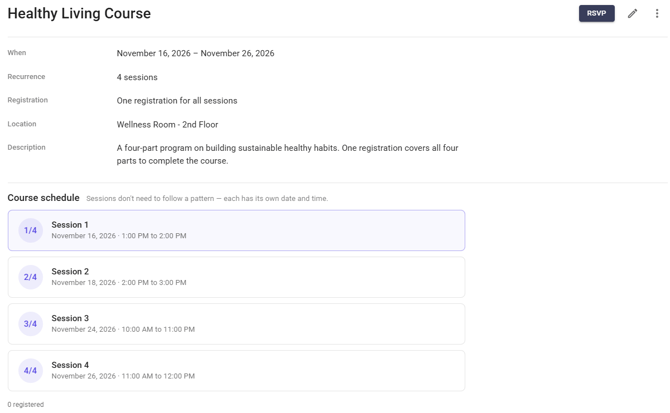
- A course page lists every part under **Course schedule**. Parts don't need to follow a pattern; each has its own date and time.
- [FAQs](https://learn.intranetconnections.com/faqs?hsLang=en-ca#main-content)
- [AI](https://learn.intranetconnections.com/faqs?hsLang=en-ca#ai)
- [Onboarding & Setup](https://learn.intranetconnections.com/onboarding-setup?hsLang=en-ca#main-content)
- [Migration](https://learn.intranetconnections.com/onboarding-setup?hsLang=en-ca#migration)
- [Theme & Design](https://learn.intranetconnections.com/onboarding-setup?hsLang=en-ca#theme-design)
- [Installation](https://learn.intranetconnections.com/onboarding-setup?hsLang=en-ca#installation)
- [Product News](https://learn.intranetconnections.com/product-news?hsLang=en-ca#main-content)
- [Release Notes](https://learn.intranetconnections.com/product-news?hsLang=en-ca#release-notes)
- [Product Patches](https://learn.intranetconnections.com/product-news?hsLang=en-ca#product-patches)
- [Reports](https://learn.intranetconnections.com/reports?hsLang=en-ca#main-content)
- [Intranet Analytics](https://learn.intranetconnections.com/reports?hsLang=en-ca#intranet-analytics)
- [Integrations](https://learn.intranetconnections.com/integrations?hsLang=en-ca#main-content)
- [SharePoint](https://learn.intranetconnections.com/integrations?hsLang=en-ca#sharepoint)
- [AI](https://learn.intranetconnections.com/integrations?hsLang=en-ca#ai)
- [Support](https://learn.intranetconnections.com/support?hsLang=en-ca)
- [Technical Setup & Configuration](https://learn.intranetconnections.com/technical-setup-configuration?hsLang=en-ca#main-content)
- [Intranet Settings](https://learn.intranetconnections.com/technical-setup-configuration?hsLang=en-ca#intranet-settings)
- [Disaster Recovery](https://learn.intranetconnections.com/technical-setup-configuration?hsLang=en-ca#disaster-recovery)
- [Advanced Configuration](https://learn.intranetconnections.com/technical-setup-configuration?hsLang=en-ca#advanced-configuration)
- [How To's](https://learn.intranetconnections.com/how-tos?hsLang=en-ca#main-content)
- [Multilingual](https://learn.intranetconnections.com/how-tos?hsLang=en-ca#multilingual)
- [Navigation](https://learn.intranetconnections.com/how-tos?hsLang=en-ca#navigation)
- [Intranet Architecture](https://learn.intranetconnections.com/how-tos?hsLang=en-ca#intranet-architecture)
- [Security & Permissions](https://learn.intranetconnections.com/how-tos?hsLang=en-ca#security-permissions)
- [Private Cloud](https://learn.intranetconnections.com/how-tos?hsLang=en-ca#private-cloud)
- [Feature Requests](https://learn.intranetconnections.com/how-tos?hsLang=en-ca#feature-requests)
- [Forms & Workflows](https://learn.intranetconnections.com/how-tos?hsLang=en-ca#forms-workflows)
- [Your Guide to Transitioning to IC 3.0](https://learn.intranetconnections.com/how-tos?hsLang=en-ca#your-guide-to-transitioning-to-ic-3-0)
- [Best Practices](https://learn.intranetconnections.com/best-practices?hsLang=en-ca#main-content)
- [Design](https://learn.intranetconnections.com/best-practices?hsLang=en-ca#design)
- [Getting Started](https://learn.intranetconnections.com/best-practices?hsLang=en-ca#getting-started)
- [Applications](https://learn.intranetconnections.com/applications?hsLang=en-ca#main-content)
- [Documents](https://learn.intranetconnections.com/applications?hsLang=en-ca#documents)
- [Internal Resources](https://learn.intranetconnections.com/applications?hsLang=en-ca#internal-resources)
- [Announcements](https://learn.intranetconnections.com/applications?hsLang=en-ca#announcements)
- [Engagement](https://learn.intranetconnections.com/applications?hsLang=en-ca#engagement)
- [Advertising](https://learn.intranetconnections.com/applications?hsLang=en-ca#advertising)
- [Account & Support](https://learn.intranetconnections.com/account-support?hsLang=en-ca#main-content)
- [Our Services](https://learn.intranetconnections.com/account-support?hsLang=en-ca#our-services)
- [Security](https://learn.intranetconnections.com/security?hsLang=en-ca#main-content)
- [Security News & Updates](https://learn.intranetconnections.com/security?hsLang=en-ca#security-news-updates)
- [Widgets](https://learn.intranetconnections.com/widgets?hsLang=en-ca#main-content)
- [What's New Feed](https://learn.intranetconnections.com/widgets?hsLang=en-ca#whats-new-feed)
- [Content & Media Widgets](https://learn.intranetconnections.com/widgets?hsLang=en-ca#content-media-widgets)
- [Engagement Widgets](https://learn.intranetconnections.com/widgets?hsLang=en-ca#engagement-widgets)
[](https://intranetconnections.com)
Copyright © 2025, Intranet Connections
```json
{
"@context" : "https://schema.org",
"@type" : "VideoObject",
"contentUrl" : "https://7578106.fs1.hubspotusercontent-na1.net/hubfs/7578106/video_assets/217730226221/inherited/web_optimized.mp4",
"dateModified" : "2026-07-22T15:16:31.979Z",
"duration" : "PT1M48.782S",
"height" : 1080,
"name" : "IC 3.0 Events Calendar",
"thumbnailUrl" : "https://7578106.fs1.hubspotusercontent-na1.net/hubfs/7578106/IC%203.0%20Events%20Calendar.mp4/medium.jpg",
"uploadDate" : "2026-07-22T15:16:31.977Z",
"width" : 1920
}
```