---
title: IC 3.0 Employee Directory
description: Learn how to use the Employee Directory to search, filter, sort, and view employee profiles with flexible card and list view options.
---
[Skip to content](https://learn.intranetconnections.com/employee-directory#main-content)

Open main navigation
Close main navigation
- [Contact Support](mailto:support@intranetconnections.com)
[Contact Support](mailto:support@intranetconnections.com)
How can we help you?
- There are no suggestions because the search field is empty.
1. [IC Knowledge Hub](https://learn.intranetconnections.com/?hsLang=en-ca)
2. [How To's](https://learn.intranetconnections.com/how-tos?hsLang=en-ca)
3. [Navigation](https://learn.intranetconnections.com/how-tos?hsLang=en-ca#navigation)
# IC 3.0 Employee Directory
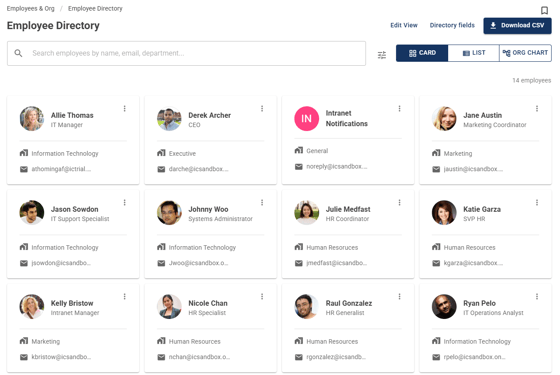
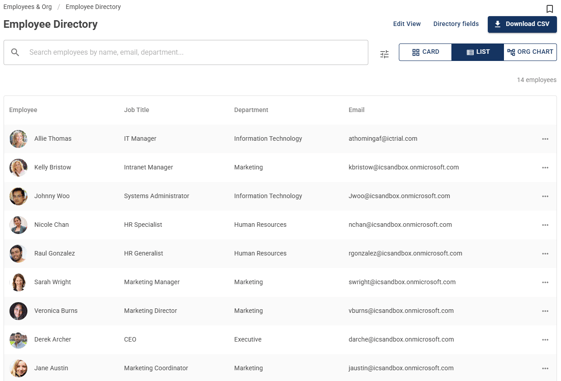
## Employee directory displays a list of employees with search, sorting, card, list view options, and an org chart. Users can access the Employee Directory from the global navigation.
#### Employee Directory Views
Card View
List View
#### 
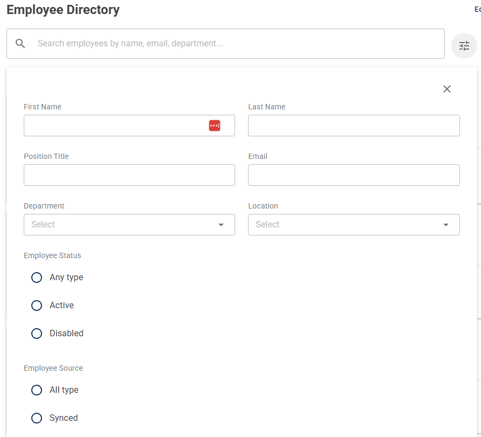
Search and filter by name, email, department, locations, etc
#### Org Chart
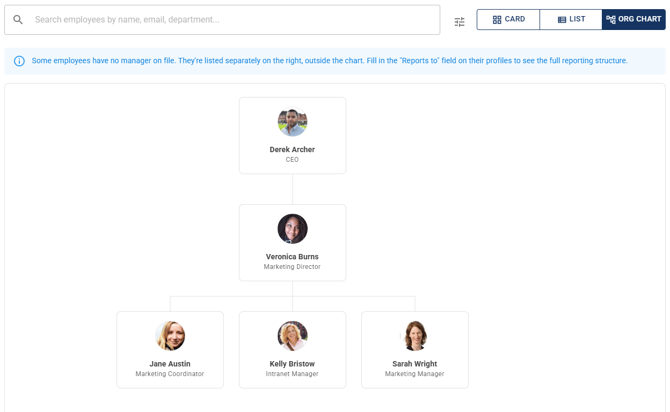
The Org Chart draws your reporting structure as a tree, built from your existing Reports To data. Each employee appears as a card with their photo, name, and job title, connected to their manager. Click any card to jump to that person's profile, and scroll and zoom to navigate larger organizations. Employees without an assigned manager appear as their own root-level cards, and the chart shows active employees only, consistent with the other views.
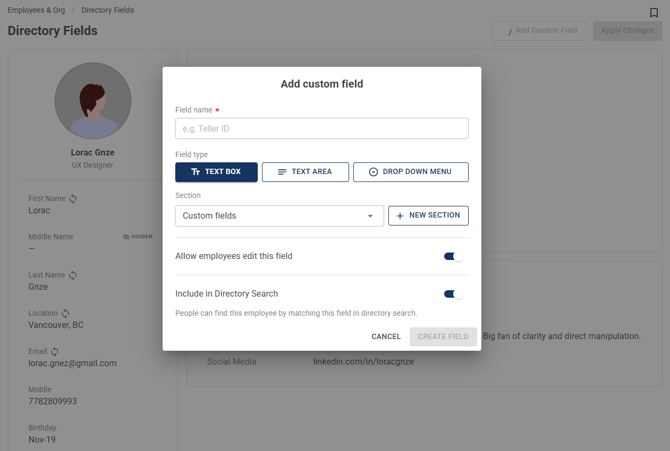
#### Add Custom Fields
If there are additional fields you'd like to add to an employee's profile in the directory, use Custom Fields to add.
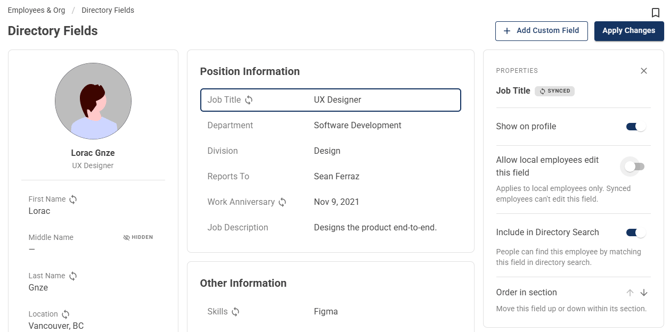
#### Manage Which Fields Employees Can Edit
Toggle the "Allow local employees to edit this field" setting on or off to allow or prevent employees from editing the field on their profiles.
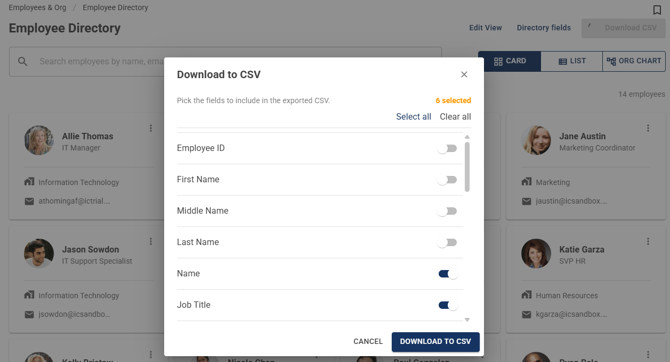
#### Download CSV
Click on "Download CSV" to export the employee directory via CSV. Pick the fields to include in the exported CSV from the popup.
- [FAQs](https://learn.intranetconnections.com/faqs?hsLang=en-ca#main-content)
- [AI](https://learn.intranetconnections.com/faqs?hsLang=en-ca#ai)
- [Onboarding & Setup](https://learn.intranetconnections.com/onboarding-setup?hsLang=en-ca#main-content)
- [Migration](https://learn.intranetconnections.com/onboarding-setup?hsLang=en-ca#migration)
- [Theme & Design](https://learn.intranetconnections.com/onboarding-setup?hsLang=en-ca#theme-design)
- [Installation](https://learn.intranetconnections.com/onboarding-setup?hsLang=en-ca#installation)
- [Product News](https://learn.intranetconnections.com/product-news?hsLang=en-ca#main-content)
- [Release Notes](https://learn.intranetconnections.com/product-news?hsLang=en-ca#release-notes)
- [Product Patches](https://learn.intranetconnections.com/product-news?hsLang=en-ca#product-patches)
- [Reports](https://learn.intranetconnections.com/reports?hsLang=en-ca#main-content)
- [Intranet Analytics](https://learn.intranetconnections.com/reports?hsLang=en-ca#intranet-analytics)
- [Integrations](https://learn.intranetconnections.com/integrations?hsLang=en-ca#main-content)
- [SharePoint](https://learn.intranetconnections.com/integrations?hsLang=en-ca#sharepoint)
- [AI](https://learn.intranetconnections.com/integrations?hsLang=en-ca#ai)
- [Support](https://learn.intranetconnections.com/support?hsLang=en-ca)
- [Technical Setup & Configuration](https://learn.intranetconnections.com/technical-setup-configuration?hsLang=en-ca#main-content)
- [Intranet Settings](https://learn.intranetconnections.com/technical-setup-configuration?hsLang=en-ca#intranet-settings)
- [Disaster Recovery](https://learn.intranetconnections.com/technical-setup-configuration?hsLang=en-ca#disaster-recovery)
- [Advanced Configuration](https://learn.intranetconnections.com/technical-setup-configuration?hsLang=en-ca#advanced-configuration)
- [How To's](https://learn.intranetconnections.com/how-tos?hsLang=en-ca#main-content)
- [Multilingual](https://learn.intranetconnections.com/how-tos?hsLang=en-ca#multilingual)
- [Navigation](https://learn.intranetconnections.com/how-tos?hsLang=en-ca#navigation)
- [Intranet Architecture](https://learn.intranetconnections.com/how-tos?hsLang=en-ca#intranet-architecture)
- [Security & Permissions](https://learn.intranetconnections.com/how-tos?hsLang=en-ca#security-permissions)
- [Private Cloud](https://learn.intranetconnections.com/how-tos?hsLang=en-ca#private-cloud)
- [Feature Requests](https://learn.intranetconnections.com/how-tos?hsLang=en-ca#feature-requests)
- [Forms & Workflows](https://learn.intranetconnections.com/how-tos?hsLang=en-ca#forms-workflows)
- [Your Guide to Transitioning to IC 3.0](https://learn.intranetconnections.com/how-tos?hsLang=en-ca#your-guide-to-transitioning-to-ic-3-0)
- [Best Practices](https://learn.intranetconnections.com/best-practices?hsLang=en-ca#main-content)
- [Design](https://learn.intranetconnections.com/best-practices?hsLang=en-ca#design)
- [Getting Started](https://learn.intranetconnections.com/best-practices?hsLang=en-ca#getting-started)
- [Applications](https://learn.intranetconnections.com/applications?hsLang=en-ca#main-content)
- [Documents](https://learn.intranetconnections.com/applications?hsLang=en-ca#documents)
- [Internal Resources](https://learn.intranetconnections.com/applications?hsLang=en-ca#internal-resources)
- [Announcements](https://learn.intranetconnections.com/applications?hsLang=en-ca#announcements)
- [Engagement](https://learn.intranetconnections.com/applications?hsLang=en-ca#engagement)
- [Advertising](https://learn.intranetconnections.com/applications?hsLang=en-ca#advertising)
- [Account & Support](https://learn.intranetconnections.com/account-support?hsLang=en-ca#main-content)
- [Our Services](https://learn.intranetconnections.com/account-support?hsLang=en-ca#our-services)
- [Security](https://learn.intranetconnections.com/security?hsLang=en-ca#main-content)
- [Security News & Updates](https://learn.intranetconnections.com/security?hsLang=en-ca#security-news-updates)
- [Widgets](https://learn.intranetconnections.com/widgets?hsLang=en-ca#main-content)
- [What's New Feed](https://learn.intranetconnections.com/widgets?hsLang=en-ca#whats-new-feed)
- [Content & Media Widgets](https://learn.intranetconnections.com/widgets?hsLang=en-ca#content-media-widgets)
- [Engagement Widgets](https://learn.intranetconnections.com/widgets?hsLang=en-ca#engagement-widgets)
[](https://intranetconnections.com)
Copyright © 2025, Intranet Connections
```json
{
"@context" : "https://schema.org",
"@type" : "VideoObject",
"contentUrl" : "https://7578106.fs1.hubspotusercontent-na1.net/hubfs/7578106/video_assets/221952623268/inherited/web_optimized.mp4",
"dateModified" : "2026-09-15T14:44:32.979Z",
"duration" : "PT1M48S",
"height" : 1080,
"name" : "IC 3.0 Employee Directory",
"thumbnailUrl" : "https://7578106.fs1.hubspotusercontent-na1.net/hubfs/7578106/IC%203.0%20Employee%20Directory.mp4/medium.jpg",
"uploadDate" : "2026-09-15T14:44:32.977Z",
"width" : 1920
}
```